
A device is offline
The Edge is online but a device is unreachable or will not claim.
The Edge is Online, but a device on it is offline, unreachable, or will not claim.
Is every device on this Edge affected?If nothing behind the Edge has ever reported, this is not a per-device fault — go to The Edge is online, but no devices are reporting.
The Edge reaches devices from inside its container over your local network, so the trace runs from there outwards — not from your laptop.
1. Can the Edge reach the device at all?
Open the device in Xyte and click the ping icon next to Device IP/Hostname. The Edge pings the saved address and shows the result; the full output is in the device's Commands tab. A ping from your own laptop doesn't count: it has to come from the Edge.
If you have shell access to the Edge host, you can run the same check from inside the Edge:
docker exec -it xyte_edge sh
ping <device ip>- Replies — the device is reachable; the problem is the protocol or its credentials, not the network. Continue to step 3.
Destination Host Unreachable— a local answer, not the device. Usually a Docker subnet collision; see the last row of the table below.- Timeout / 100% loss — the Edge has no path to the device: it is off, on a different VLAN or subnet with no route from the Edge, or a firewall blocks it on the way. This holds even if you can reach the device from elsewhere.
2. Is that address the device's own IP?
The Edge stores one address per device and uses it for both the status check and the protocol polling. A router, control processor, or jump host that forwards to the device does not work — see the Devices behind NAT tab, which is the single most common cause of "everything looks online but nothing is real".
3. Does the device need something enabled first?
Many devices ship with their control protocol switched off — PJLink on projectors, IP Control on displays, local network access on Logitech CollabOS. Nothing reaches them until it is turned on: Device prerequisites by vendor.
Common cases
| Scenario or error | Likely meaning | Recommended next steps |
|---|---|---|
| Device cannot be added even though Edge is online | The internal container may not have connectivity to the device. | If the device IP is 192.168.1.99, run these checks:1. Run docker ps2. Enter the xyte_edge container: docker exec -it xyte_edge bash3. Run docker ps again from inside the container, if applicable4. Enter the second container: docker exec -it container_id bash5. Ping the device: ping 192.168.1.99You can also ping the device using the ping command in the Edge agent device overview page. |
| Multiple Edge devices are falling offline at the same time | This usually points to a broader Edge-agent or network issue. | Check in this order: 1. If the Edge agent itself is offline, start here: Edge offline troubleshooting 2. If only a specific device cannot be reached, try using the ping command from the Edge agent |
| The Edge is Online, but devices on a 172.17.x.x or 172.18.x.x subnet are never reachable | Those ranges overlap Docker's own default networks - docker0 uses 172.17.0.0/16 and further Docker networks take 172.18.0.0/16 onward. Traffic for the device subnet is routed to the Docker bridge instead of the physical NIC, so the devices are never reached even though the Edge itself is connected. | The tell is a ping that returns Destination Host Unreachable rather than timing out - that reply is generated locally, not by the device.1. On the Edge host run ip route get for one of the device addresses, and check whether it selects docker0 or a br-* interface instead of the real NIC2. If it does, change Docker's address pool so it no longer overlaps the device network: set default-address-pools in daemon.json (Docker Desktop: Settings, then Docker Engine) to a base outside your device ranges, for example 10.200.0.0/16 with size 243. Restart Docker and re-check the route |
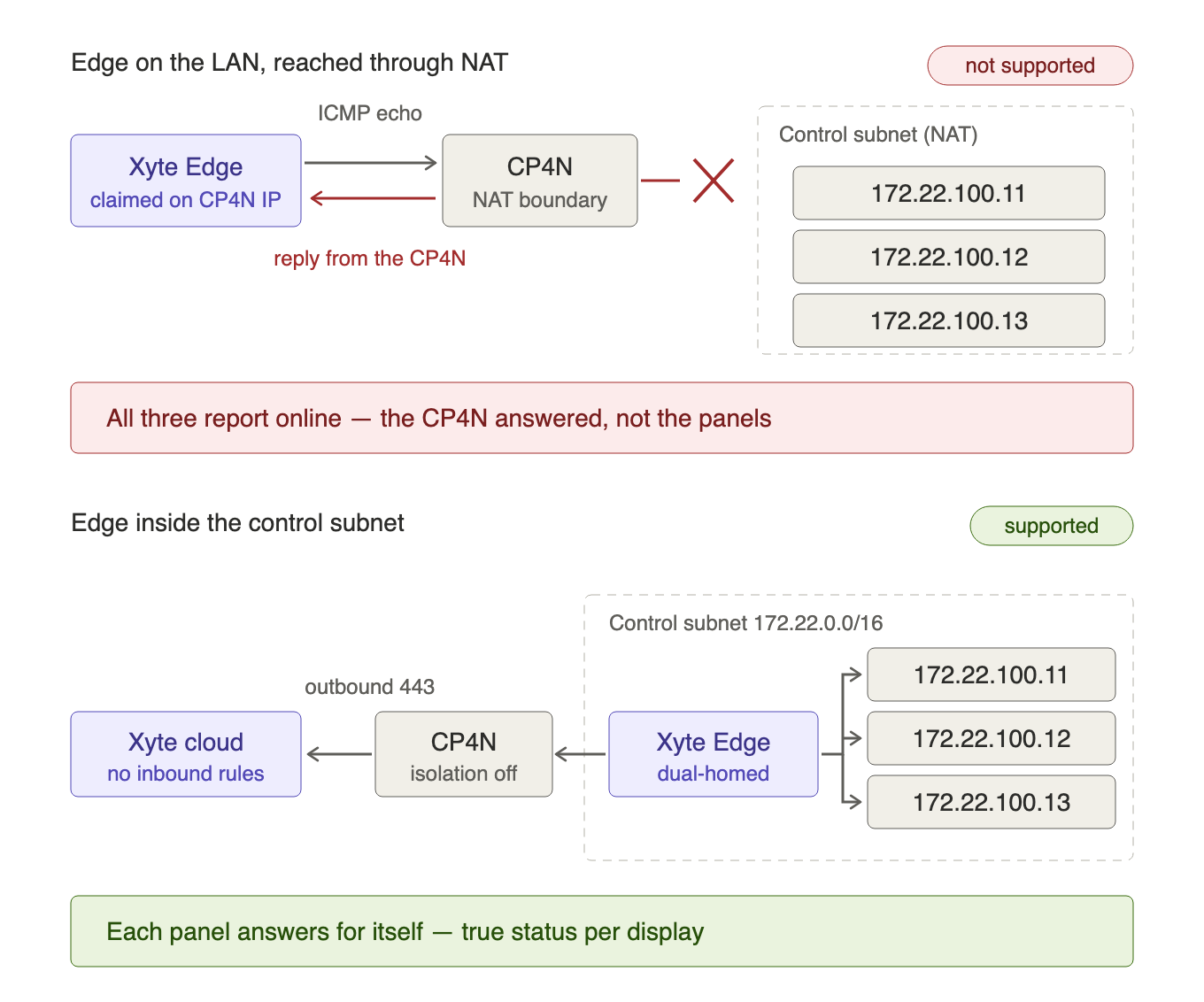
The Edge stores a single address per device and uses it both for the ICMP status check and for any protocol polling. It must be the device's own IP address, reachable by Layer-3 routing from the Edge host, with ICMP echo permitted.
Address translation is not supported. Pointing the Edge at a router, control processor, or jump host that NATs or port-forwards to the device — for example a Crestron CP4N Control Subnet port mapping — does not work:
- ICMP has no port, so a port mapping cannot carry the status check.
- The pings are answered by the intermediary, not the device. Every device behind it reports online for as long as the intermediary is up, and a powered-off or failed device never raises an incident. The claim-time reachability check also passes on the intermediary's reply, so the misconfiguration is accepted silently rather than reported as an error.
Symptom to look for: several devices that share one upstream appliance are permanently online with near-identical response times, and go offline together.
Resolution: confirm each device is claimed with its own IP address, routed and pingable from the Edge host. If the devices sit on an isolated subnet that can only be reached through NAT (such as a Crestron control subnet), deploy an Edge inside that subnet — on a dual-homed host, or on a dedicated host/VM on the isolated side. The Edge needs outbound access only, so no inbound rules or mappings are required. Note that a host can run only one Edge agent.
Monitoring devices across multiple subnets
A single Edge can monitor devices on multiple subnets as long as Layer-3 routing gives the Edge host ICMP reachability to each device's native IP address. The Edge monitors by IP address — it does not need to be physically or logically attached to the same broadcast domain as the device.
For example, if a site has several Crestron CP4N processors, each creating a separate 172.22.x.x Control Subnet, one Edge can reach devices across all of them provided that:
- Layer-3 routing is configured between the Edge host and each Control Subnet (not NAT — see above).
- ICMP echo is permitted end-to-end to each device's own IP.
If Layer-3 routing between subnets is not feasible, deploy a separate Edge inside each isolated subnet. The Edge is a Docker container and can run on a VM or any host that meets the machine requirements — no dedicated physical appliance is needed.
Last updated: 2026-09-14
Updated 9 days ago