
The Edge is online, but no devices are reporting
The Edge is Online but the devices behind it are not reporting — never seen since they were claimed, or all stopped together. Trace where the connection to your devices breaks.
The Edge shows Online, but the devices behind it are not reporting — either they have never reported since the day they were claimed, or they were reporting normally and then all went quiet together.
Online describes only the Edge's connection to Xyte. It says nothing about whether the Edge can reach your devices — those are two separate network paths, and one can be perfectly healthy while the other reaches nothing.
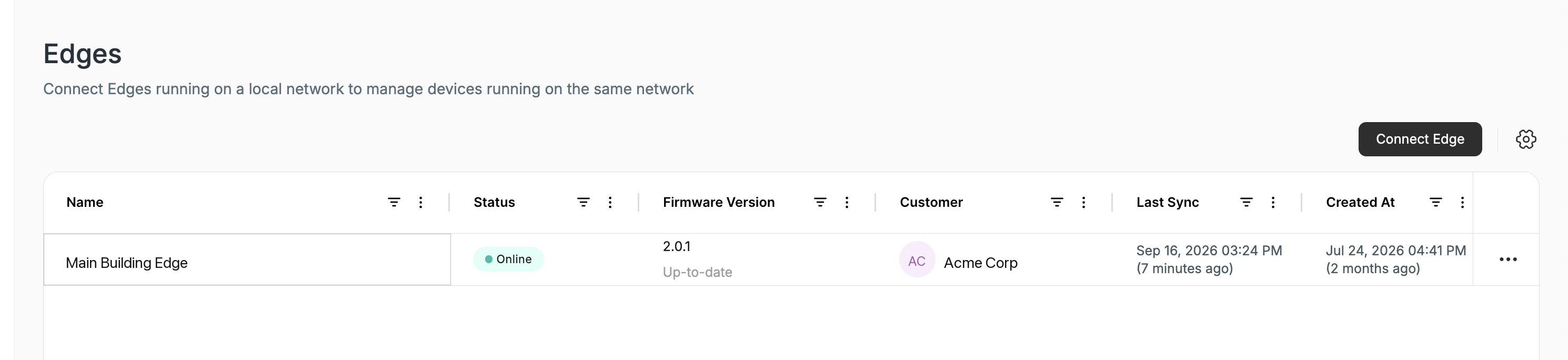
Online, synced minutes ago — and not one device behind it has ever reported.
Which of the two are you seeing?
The status on the devices tells you which one. It changes what to suspect first — the checks further down are the same for both.
Never seen means a device has never reported since it was claimed, so the problem has existed since day one: the Edge has never had a working path to it. Usually every device behind the Edge is affected, and it is a new site or a newly claimed batch.
What to suspect first:
- The devices are on a different VLAN or subnet from the Edge host, with no route between them.
- A firewall or ACL sits between the Edge host and the device network.
- The device's management protocol is still switched off, or its setup parameters were never entered.
- The IP address entered when the device was claimed is wrong.
Start at step 1.
Offline means a device reported before and then stopped. One device going Offline on its own is a device problem — use A device is offline. It belongs on this page when a group of devices behind the same Edge stopped at around the same time: something broke on the path from the Edge to that network, rather than on every device at once.
Two checks separate the two:
- Did they stop together? Compare when each device was last seen. A group whose last-seen times land within the same minute is one network event, not several device failures.
- Is anything behind this Edge still reporting? A device that is still reporting proves the Edge itself is healthy, and narrows the fault to the part of the network the quiet devices sit on.
Because it worked before, look for what changed:
- A VLAN, switch-port or uplink change on the device side, or a switch that failed.
- A new firewall or ACL rule.
- The devices were re-addressed, or DHCP handed them new IP addresses. Xyte does not detect IP changes, so the address on the device in Xyte has to be updated to match.
- The devices lost power, or a rack or room went down.
Then run step 1 against several of the affected devices, and against one that is still reporting. If every affected device returns 100% packet loss while the healthy one replies, the Edge has lost its path to that network.
The vendor's own cloud dashboard can still show these devices as healthy. It usually reaches them over a different network path than the Edge does, so the two can legitimately disagree.
If the Edge itself is not Online, start at The Edge is offline.
1. Ping a device from the portal
Fastest: from the device itself. Open the device that is not reporting and click the ping icon next to Device IP/Hostname. There is nothing to type — the Edge pings the address saved on the device. The result appears as a notification, and the full output is kept in the device's Commands tab.
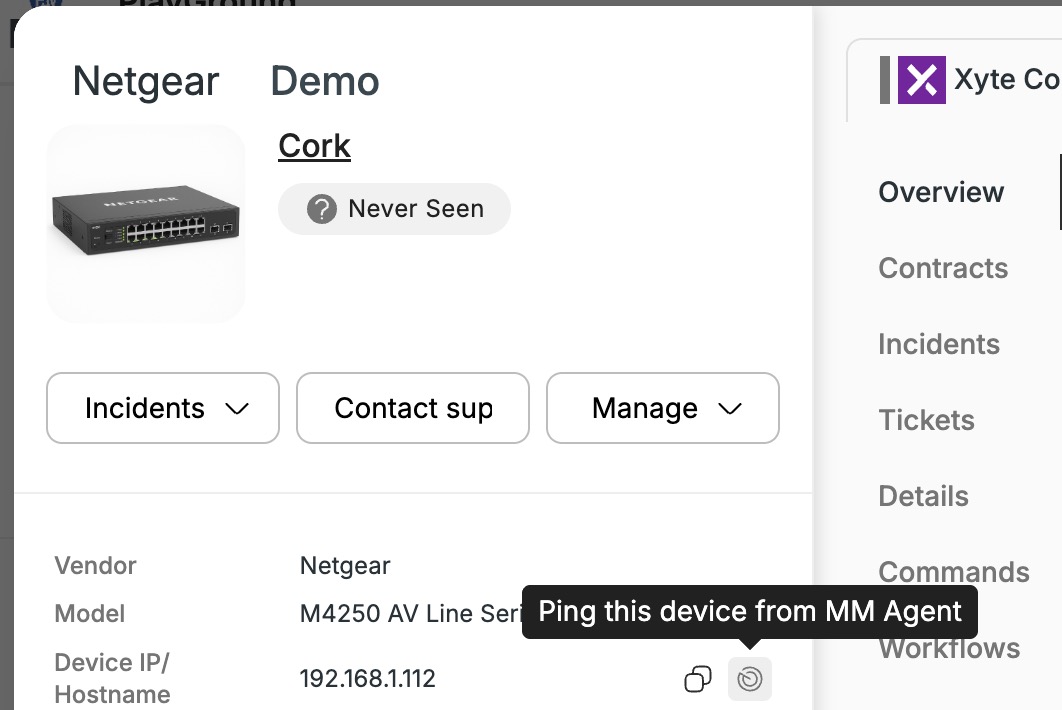
The ping icon is shown to users who can edit the device.
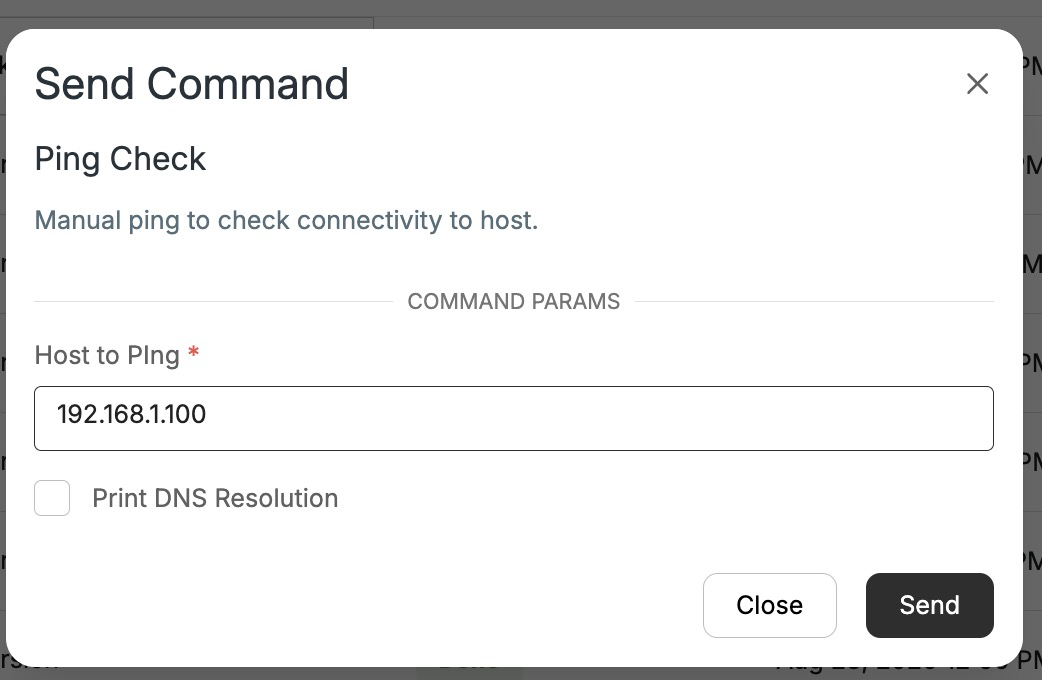
Any IP address: from the Edge agent. To test an address that is not on a device yet — a gateway, for example — open the Edge agent's device page, click Ping Check in its Commands section, enter the IP and click Send. Leave Print DNS Resolution unchecked when you enter an IP address. The result is in the Edge's Commands tab, under All Commands.
Open the result and read the Message. The packet-loss line is the diagnosis:
| Message | Meaning | Next |
|---|---|---|
Replies, 0% packet loss | The Edge reaches the device. | Step 4 |
0 received, 100% packet loss | Nothing came back. The device is unreachable. | Step 2 |
Destination Host Unreachable | Nothing answered at that address on the Edge's local network: the device is off, unplugged or at a different IP. If the device subnet is 172.17.x / 172.18.x, it can instead be a Docker network overlap. | Check the device and its IP · on 172.17.x / 172.18.x: Docker overlap |
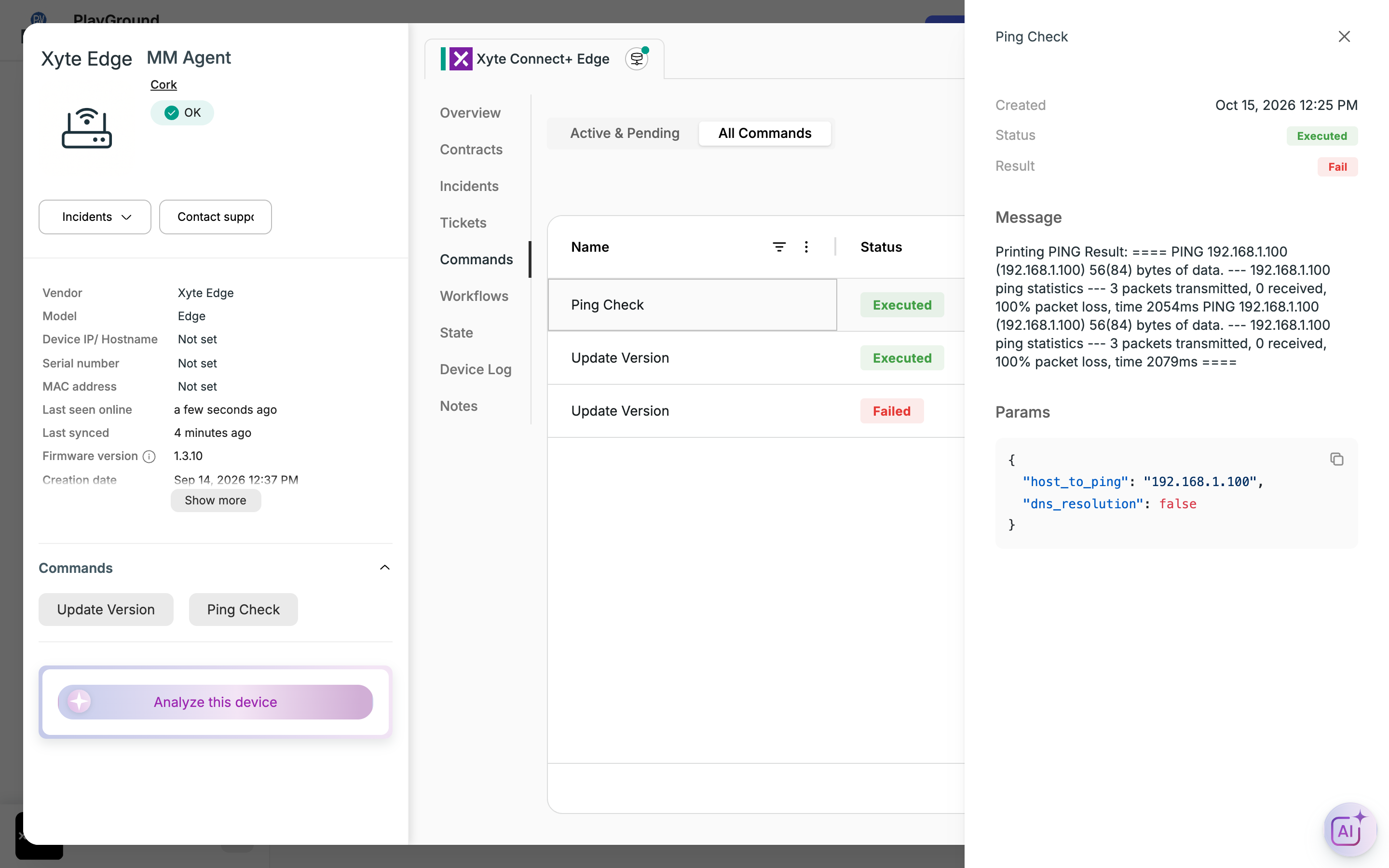
Status shows Executed whenever the command ran — including when the ping failed. Check Result (Fail means no replies) and read the Message.
2. Ping from the Edge host
The Edge uses the host machine's network stack, so "can the Edge reach the device?" is the same question as "can the host reach it?" — which you can test without Xyte:
ping <device-ip>Replies here but a failure in step 1 is worth reporting to [email protected]. Otherwise the device is genuinely unreachable from this machine — continue below.
3. Find what is blocking it
Start with the host's own addressing. A wrong subnet mask is quick to rule out and looks exactly like a firewall block, so check it before anyone changes firewall rules:
ipconfig /all          # Windows
ip -brief address      # Linux
If the mask is too narrow, devices that are in fact on the same local network look remote. The host sends their traffic to the default gateway instead of directly to them, and it disappears there.
| Symptom | The Edge stayed Online for weeks. Every device returned 100% packet loss with no error, and firewall changes made no difference. |
| Cause | The host's mask was 255.255.255.252 (a /30) instead of 255.255.252.0 (a /22). The gateway sat inside that /30, so cloud access kept working while every device — which belonged on the same /22 — looked remote and was dropped at the gateway. |
| Fix | Corrected the mask. Every device came online within minutes. |
Then, in order:
- Permit ICMP echo request and reply from the Edge host to each device. This drives the status check on every device, and on heartbeat-only models it is the only signal there is. This includes the device's own firewall: devices that run Windows, such as meeting-room PCs, block incoming ping by default, so allow it on the device itself, not only on the network.
- Check the route —
ip route get <device-ip>. If it leaves via the wrong interface, a static route is missing. See Networking. - Open the device's management port — see Requirements. ICMP alone gives online/offline but no telemetry.
- Confirm the device is powered on and still at that address. Xyte does not detect IP changes; update the address on the device in Xyte if it moved.
- Check whether the device restricts management access by source address, and permit the Edge host's IP.
After a host networking fix the Edge picks the change up on its own — restarting the container is optional, and only forces an immediate re-poll.
4. Ping works, but there is still no telemetry
The network is fine and the remaining causes are on the device:
- The management protocol is switched off — SNMP, PJLink, IP Control and similar ship disabled. See Device prerequisites by vendor.
- The SNMP community string does not match. Unless a model exposes a community string parameter, Xyte polls with
public. - Setup parameters are missing — credentials, a port or a device ID entered once after claiming. See User Parameters.
5. Less common causes
| Cause | Sign | Resolution |
|---|---|---|
| Docker Desktop bridge collision | Destination Host Unreachable, device subnet on 172.17.x / 172.18.x | Windows and macOS cannot use host networking, so a Docker bridge exists and can overlap your device subnet. Contact [email protected]. |
| Orphaned Edge container | Ping Check reaches 8.8.8.8 but not your devices, your gateway or the Edge host's own IP, and docker ps -a on the host shows no xyte_edge | An old container is still running the Edge out of Docker's sight. See The Edge is online, but its container is orphaned. |
| NAT or port forwarding | Several devices behind one appliance are permanently online with near-identical response times | Not supported — the Edge stores one IP per device and must reach it by Layer-3 routing. See Edge Connectivity. |
Still not reporting?
Send [email protected] the ping output from step 1, the ping output from step 2, the output of ip -brief address and ip route get <device-ip> from the Edge host, and the affected device names with their IP addresses. If the devices were reporting before and then stopped, add roughly when they stopped and whether anything else behind the same Edge is still reporting.
Updated 11 days ago