
Networking
How the Connect+ Edge reaches devices at the IP level — routing, multiple NICs, isolated VLANs and DMZ deployments.
How the Edge reaches devices
The Connect+ Edge talks to every monitored device over plain IP. It addresses each device by IP address and speaks the device's own management protocol (HTTP(s), SNMP, IPMI or a vendor protocol) — see Requirements for the port list.
Five rules govern every Edge deployment:
- Devices are reached by IP address. There is no discovery protocol, no broadcast or multicast, and no agent installed on the device. Nothing has to be on the same switch or subnet as the Edge, and devices keep their existing addresses — nothing is reconfigured on the device.
- The Edge uses the host machine's network stack. It runs in Docker host network mode, so it sees the host's interfaces, IP addresses and routing table directly — there is no Docker bridge, no NAT and no port mapping to configure.
- "Can the Edge reach the device?" is the same question as "can the host machine reach the device?" Anything you can reach from a shell on the Edge host, the Edge can reach. This makes every routing problem testable without involving Xyte.
- All connections are outbound from the Edge. The Edge opens connections to devices and to the Xyte servers. It never listens for inbound connections — not from devices, not from Xyte, not from anywhere.
- The Edge never routes between its own interfaces. Traffic arriving on one NIC is never forwarded out another. This is the property that makes the multi-NIC and DMZ topologies below safe.
Because rule 2 puts routing entirely in the hands of the host OS, everything on this page is configured on the machine, not in the Edge itself. There are no network settings inside the Edge to change.
Running the Edge inside a virtual machine? Then the VM is the Edge host. Every device network the Edge should reach must be attached to the VM as its own virtual adapter — a Hyper-V External switch, a VMware port group, a Proxmox bridge. The hypervisor's physical NICs and routing table are not visible to the VM, so a NIC added to the hypervisor alone does nothing for the Edge.
How many Edges do I need?
One Edge per site — a physically separate location with its own network — not one per room, VLAN or switch. A single Edge host attached to several isolated networks (the Separate VLANs topology below) monitors all of them, and where rooms are routed back to a central network the Edge only needs to sit on that network. Each Edge monitors up to 500 devices on the minimum spec, or up to 1,000 on a 2 vCPU / 4 GB machine; see Requirements for sizing. An Edge hosted in a cloud or central data center can also serve several sites, as long as each site's network is routed to it (for example over Site-to-Site VPN or Direct Connect), latency stays low and the device count stays within these limits — see Running on AWS EC2.
Choosing a topology
| Topology | Edge host NICs in use (including NIC1) | Use when |
|---|---|---|
| Basic setup | 1 | Devices are on the same LAN, or on a subnet the site router already routes to. |
| Connected VLANs | 2 | Device VLANs are routed to each other but kept off the internet-facing network. |
| Separate VLANs | 3+ | Device VLANs must stay isolated from each other as well as from the internet. |
| DMZ | 2 | The device network must be fully sealed and the Edge is the only crossing point. |
Devices never connect to the internet.In every topology below, the Edge host is the only thing that connects out — on TCP
443, to the Xyte Edge endpoint (and to Docker Hub for container updates). The devices themselves need no internet access, no outbound firewall rules and no NAT.NIC1 is always the internet-facing NIC. It is the only interface that carries the Edge's outbound connection to Xyte, and it holds the host's default route. Any additional NICs (NIC2, NIC3…) face device networks only and never reach the internet. In the basic setup, the single NIC does both.
All four are equally supported. The Edge behaves identically in each — only the host's addressing and routing differ.
Deployment topologies
The four patterns below cover essentially every site. They differ only in how many networks the Edge host is attached to and whether those networks are allowed to reach each other.
Basic setup
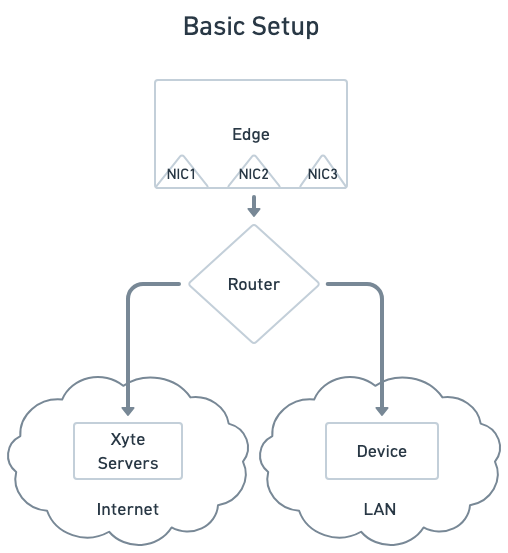
The Edge host uses a single NIC. Through the site router, the Edge connects out to the Xyte servers and connects to the devices on the LAN. The devices themselves never reach the internet.
This is the simplest and most common deployment. It suits any site where the devices sit on the same LAN as the Edge host, or on another subnet that the site router already routes to.
What the network has to provide
- A default route from the Edge host to the internet, with
eu1.edge.xyte.io:443reachable. - A route from the Edge host's subnet to each device subnet, permitted by any firewall or ACL in between.
Connected VLANs
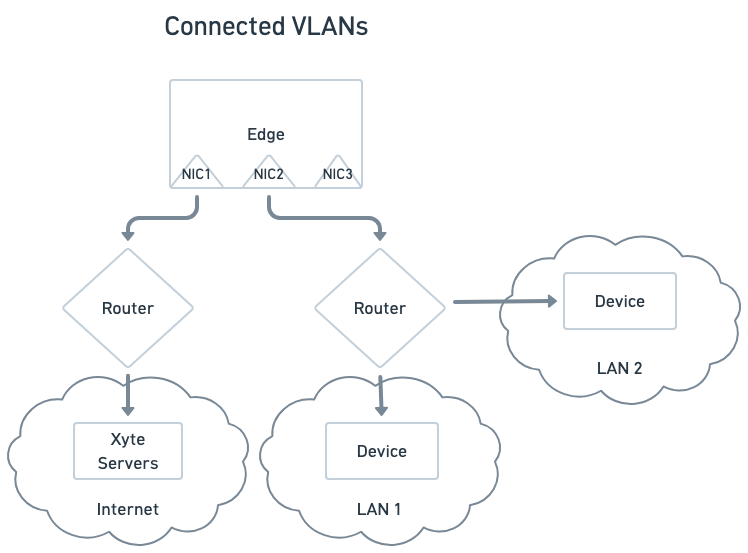
The Edge host uses two NICs. NIC1 faces the internet-facing router. NIC2 faces a router that serves LAN 1 and also routes onward to LAN 2.
Use this when device VLANs are routed to each other but are kept off the internet-facing network. The Edge only needs to be attached to one of them — the router on NIC2 handles the rest.
What the network has to provide
- The default route on NIC1 only.
- A static route on the Edge host for LAN 2's subnet, via the router on NIC2. LAN 1 is directly attached and needs no route; LAN 2 is not, and will otherwise be sent out the default gateway.
- Routing between LAN 1 and LAN 2 permitted on the router serving NIC2.
Separate VLANs
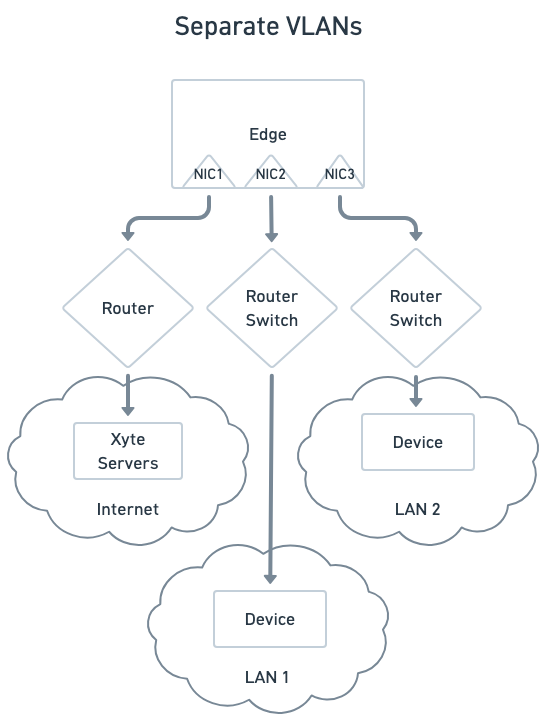
The Edge host uses three NICs, one per network: NIC1 to the internet, NIC2 to LAN 1, NIC3 to LAN 2. LAN 1 and LAN 2 have no route to each other and no route to the internet.
Use this when device VLANs must stay fully isolated — from each other and from the outside — while still being monitored. The Edge host is multi-homed and reaches each VLAN directly on its own interface, so no traffic ever has to cross between them.
What the network has to provide
- One IP address for the Edge host on each VLAN, static or reserved.
- The default route on NIC1 only — LAN 1 and LAN 2 are directly attached and need no routes of their own. Only subnets sitting behind a router inside those VLANs need static routes.
- IP forwarding left disabled on the host, so the Edge host does not become a path between the isolated VLANs.
Adding another isolated VLAN is just another NIC. The pattern scales as far as the host has interfaces.
DMZ
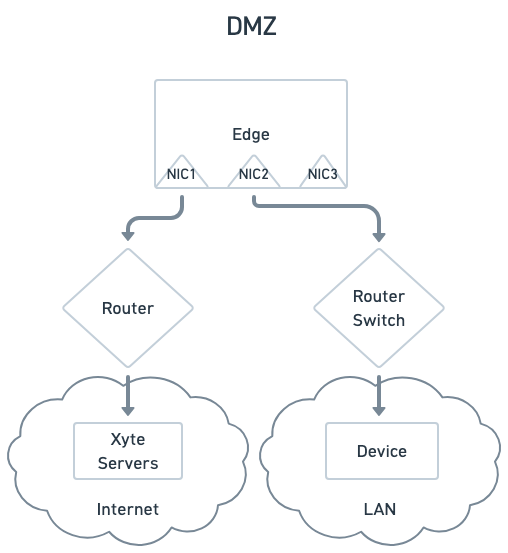
The Edge host straddles a security boundary. NIC1 sits in the internet-facing (DMZ) segment. NIC2 sits in a device network that has no internet access of its own. The Edge is the only thing touching both networks — and because it never forwards between its interfaces, the device network stays unreachable from outside.
This is the strictest posture, and usually the one security teams ask for:
- The device network needs no internet access, no outbound firewall rules and no NAT. Devices never leave their own segment.
- Only the Edge host is permitted outbound, and only on
443to the Xyte endpoints. - Nothing on the internet can reach the devices. The Edge accepts no inbound connections at all, so there is no path in even if the DMZ segment is compromised.
What the network has to provide
- An address for the Edge host in the DMZ segment (NIC1) and one in the device network (NIC2).
- The default route on NIC1, pointing at the DMZ router.
- IP forwarding left disabled on the host — this is what keeps the boundary intact.
Addressing the Edge host
Give the Edge host a static IP address, or a permanent DHCP reservation.
The host's IP ends up referenced in places that do not update themselves — firewall rules, switch ACLs, and the source-address allowlists that many devices apply to their own management interface. If the address moves, monitoring silently stops.
On a multi-homed host (more than one NIC), each connected network needs its own address on that host, and each should be static or reserved for the same reason.
Routing
A single-NIC Edge host needs nothing beyond a working default gateway. As soon as the host has more than one NIC, routing becomes explicit:
- Only one interface can carry the default route. In every topology below, that is NIC1 — the interface facing the internet. Anything the host does not have a more specific route for goes out that interface.
- Directly attached subnets need no route. The host already knows how to reach the network its own NIC sits on.
- Anything behind a router needs a static route. If a device subnet is reachable only through a router on NIC2 or NIC3, add an explicit route for that subnet. Without it, the traffic leaves via the default gateway on NIC1 and never arrives.
- Leave IP forwarding disabled. It is off by default on all supported operating systems. Leaving it off guarantees the Edge host cannot become a bridge between networks that are meant to stay separate.
A static route is a normal OS-level command — for example, on Linux:
# Device network 10.20.0.0/16 is reachable via the router at 10.10.1.1, on eth1
sudo ip route add 10.20.0.0/16 via 10.10.1.1 dev eth1
macOS (sudo route -n add -net 10.20.0.0/16 10.10.1.1) and Windows (route -p add 10.20.0.0 mask 255.255.0.0 10.10.1.1) have direct equivalents. Add the route persistently so it survives a reboot — the exact mechanism depends on the distribution or OS.
Edge in a virtual machine
The VM is the Edge host. Give it one virtual adapter per network, each attached to the matching physical NIC, and apply the routing rules above inside the VM: default gateway on the first adapter only, a static address and no gateway on the device-side adapter.
| Hypervisor | Adapter 1 (internet, default route) | Adapter 2 (device network) |
|---|---|---|
| Hyper-V | External virtual switch on NIC1, a VM network adapter on it | A second External virtual switch on NIC2, a second VM network adapter on it. Appears as eth1 in Ubuntu. |
| VirtualBox | Bridged Adapter, name = NIC1 | Bridged Adapter, name = NIC2. Appears as enp0s8 in Ubuntu. Not Host-only, Internal Network or NAT — those never reach the physical NIC. |
| VMware | Port group on the vSwitch bound to NIC1 | Port group on a vSwitch bound to NIC2 |
Verify from a shell inside the VM, not on the hypervisor: ip route must list the device subnet on the second adapter, and ping <device-ip> must answer. The hypervisor reaching the devices proves nothing about the VM.
A USB Ethernet adapter needs a driver that supports the hypervisor's virtual switch. If the switch cannot be created on it, use a PCIe NIC.
Summary for IT and security review
When a deployment needs sign-off from an IT or security team, this is the whole profile:
- One known host. The Edge host has a static address, and it is the only thing on the network that talks to Xyte.
- One outbound destination. TCP
443toeu1.edge.xyte.io, plus Docker Hub for container updates — see Requirements. No inbound rules anywhere. - Direct egress, no HTTP proxy. The Edge-to-cloud connection is not HTTP and cannot traverse a web proxy. The Edge host needs a direct outbound route on TCP
443even on networks where all other traffic goes through a proxy. - No listening ports. The Edge accepts no inbound connections — not from devices, not from Xyte, not from anywhere else.
- No changes to the device network. Devices keep their addresses and routing, and monitored devices need no internet access of their own.
- No bridging between segments. The Edge never forwards traffic between its interfaces, and IP forwarding stays disabled on the host.
- TLS inspection exemption. The connection to
eu1.edge.xyte.iouses a Xyte-issued certificate, so the Edge host must be exempt from TLS inspection and web filtering for that destination.
Xyte can provide security documentation and join a call with your security team on request — see Security.
Note for security teamsPort
443oneu1.edge.xyte.iouses a custom certificate created and distributed by Xyte, to be used by our Edge — it is not to be accessed via web browsers. Regular SSL check tools will therefore fail it.
Verifying connectivity
Every check runs from a shell on the Edge host, not from the Edge itself. If a check passes on the host, the Edge will succeed too.
| Check | Command | What a failure means |
|---|---|---|
| Reach the Xyte servers | curl -sv https://eu1.edge.xyte.io 2>&1 | head | Outbound 443 is blocked, or TLS is being inspected. See Requirements. |
| Reach the Xyte servers without a proxy | echo quit | telnet eu1.edge.xyte.io 443 | A hang means outbound 443 is silently dropped, or the host only reaches the internet through an HTTP proxy. curl honours proxy settings and can pass while the Edge cannot connect — the Edge needs a direct route. See Requirements. |
| Route to a device subnet | ip route get <device-ip> | The chosen interface is wrong — a static route is missing, or the default gateway is being used. |
| Reach a device | curl -k https://<device-ip> or snmpwalk -v2c -c <community> <device-ip> | A firewall or ACL between the Edge subnet and the device subnet is dropping the traffic. |
| Confirm host addressing | ip -brief address | A NIC has no address, or picked up an unexpected DHCP lease. |
A failed ping does not mean a failed driver. Many devices drop ICMP by policy while answering their management protocol normally. Test the actual protocol and port before concluding the device is unreachable.
Common pitfalls
| Symptom | Usual cause |
|---|---|
| Edge shows Online, but devices on one subnet never report | Missing static route on a multi-homed host — that subnet's traffic is leaving via the default gateway on NIC1. |
| Devices worked, then stopped after a reboot | A static route was added without being made persistent, or the host's DHCP lease changed its IP. |
| One VLAN works, another does not, both look correctly cabled | The second VLAN's NIC has no address, or the device subnet sits behind a router inside that VLAN and needs its own route. |
Edge cannot reach eu1.edge.xyte.io from a network that has internet | TLS inspection or a web filter is breaking the long-running connection — bypass *.xyte.io. See Edge connectivity issues. |
| The install script prints nothing and never returns | Its first step is a plain connection to eu1.edge.xyte.io:443. Outbound 443 is silently dropped, or the host only has internet through an HTTP proxy, which the Edge cannot use. Ask for a direct egress rule — see Requirements. |
| Traffic reaches the device but gets no reply | The device restricts management access by source address and does not permit the Edge host's IP. |
| The hypervisor host pings the devices, but the Edge running inside a VM on it cannot | The device-side NIC is attached to the hypervisor only. Create a virtual switch on that NIC and add a second adapter on it to the Edge VM, with a static address on the device subnet inside the VM. |
More questions? Contact the Xyte Support team ([email protected]).
Updated 6 days ago