
Customers
A high-level top-down view of your company.
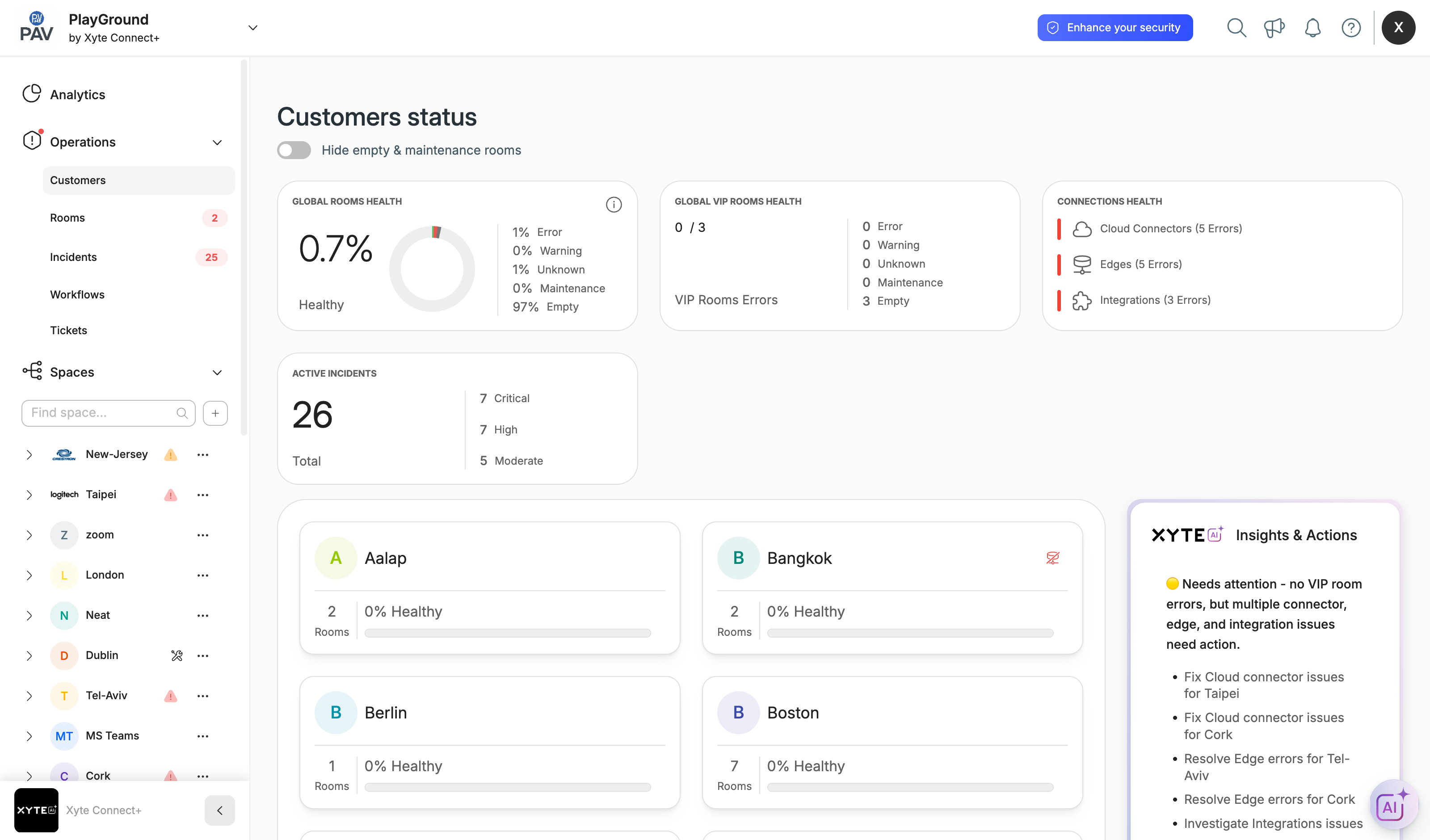
The Customers page — Operations → Customers in the left menu — is your organization-level home screen. It gives you a bird's-eye view of every customer you manage and the health of their rooms, connections and devices.
Health at a glance
Four rollups sit at the top of the page:
- Global rooms health — the overall percentage of healthy rooms, broken down into Error, Warning, Unknown, Maintenance and Empty.
- Global VIP rooms health — the same breakdown, limited to the rooms you've flagged as VIP.
- Connections health — the live status of your Cloud Connectors, Edges and Integrations, with error counts.
- Active incidents — the total number of open incidents, split into Critical, High and Moderate.
Per-customer cards
Below the rollups, each customer appears as a card showing its room count, percentage healthy, and any VIP room errors. The Insights & Actions panel on the right summarises what needs attention and suggests next steps.
Navigating spaces
To drill into a specific location, open it from the Spaces tree in the left menu. Every space has its own dashboard with its own devices, incidents and files.
Updated 2 months ago
What’s Next
Did this page help you?