
The Edge is offline
Trace an offline Edge from the host down to the root cause: Docker, DNS, port 443, container networking, firewall inspection.
The Edge shows Offline or Error in the portal.
Work down the trace in order. Each step rules out the layer before it, so stop at the first failure — everything after it fails for the same reason. If every step passes and the Edge is still offline, the last tab tells you what to send us.
Two containers, two toolsets. The Edge runs a wrapper container (xyte_edge) which starts the monitoring proxy inside it.nc,curl,nslookup,pingandbashexist in both;telnetanddigonly exist in the inner proxy container. Every command below uses tools present in both, so you never have to install anything.
0. Is the machine up, and is Docker running?
From another machine on the same network:
ping <edge host ip>If it does not answer, the host is off, asleep, or off the network — fix that first. Then log in to the host (locally, RDP, or SSH) and confirm the container is running:
docker psxyte_edge should be listed. If Docker itself will not start, or xyte_edge is missing, go to Docker won't run. If the container is gone entirely, see Reinstall or recover the agent.
Everything below runs on the Edge host.
1. Does the name resolve?
nslookup eu1.edge.xyte.ionslookup eu1.edge.xyte.ioIf nslookup is not installed (common on minimal Linux images), use one of these instead — both are always present:
getent hosts eu1.edge.xyte.io    # Linux
dig +short eu1.edge.xyte.io      # Linux and macOS
A healthy result returns a CNAME ending in .amazonaws.com plus an IP address. The IP is not fixed and may change over time — only successful resolution matters, never the specific address.
Non-existent domain, can't find, or no output means DNS is the problem: internal resolver, split-DNS, or a filtering appliance. Fix this before continuing.
2. Is port 443 reachable from the host?
if (Test-NetConnection eu1.edge.xyte.io -Port 443 -InformationLevel Quiet) { Write-Host "Connection successful" } else { Write-Host "Failed to connect to eu1.edge.xyte.io on port 443." }On failure this takes about 20 seconds and prints a yellow WARNING: TCP connect to ... failed line above the message. That warning is expected, not a separate error.
nc -zv -w 5 eu1.edge.xyte.io 443Success looks like:
Connection to eu1.edge.xyte.io port 443 [tcp/https] succeeded!If nc is unavailable, curl works everywhere:
curl -sv --connect-timeout 5 https://eu1.edge.xyte.io 2>&1 | head
curlwill report an SSL certificate error. That is expected and does not mean anything is broken.Port 443 on
eu1.edge.xyte.iouses a certificate issued by Xyte for Edge use only — it is not meant for browsers or general SSL tools. The line that matters isConnected to eu1.edge.xyte.io. If you see that, the port is reachable, regardless of what follows about the certificate.
3. Is it reachable from inside the container?
The container uses its own network path - and its own DNS resolvers - so it can fail even when the host succeeds. Check both, in this order:
docker exec -it xyte_edge sh
nslookup eu1.edge.xyte.io        # does the name resolve in here?
nc -zv -w 5 eu1.edge.xyte.io 443 # is the port reachable from in here?
Read the failure carefully - the two are different problems:
| Result | Meaning |
|---|---|
nc: bad address 'eu1.edge.xyte.io' | DNS, not the port. Nothing was sent to 443. Go to the Container cannot resolve DNS tab. |
The name resolves, but nc times out or is refused | The port is blocked on the container's network path. Check VPN software, a Docker subnet conflict, or a local firewall. |
nc and curl are already present in the container — nothing to install.
If you are following older instructions that use telnet, note that the Edge container runs Alpine Linux, which does not include it. Either use nc as above, or install telnet from inside the container:
apk update && apk add busybox-extrasapt and apt-get do not exist in this container — Alpine uses apk. Anything installed this way is removed whenever the container is updated or recreated.
Reading the results
| Step 1 — DNS | Step 2 — Host 443 | Step 3 — Container 443 | What it means | What to do |
|---|---|---|---|---|
| Fails | — | — | DNS is blocked or misconfigured | Check the resolver and any DNS filtering appliance |
| OK | Fails | Fails | Outbound 443 is blocked before it leaves the network | Network rules issue — see below |
| OK | OK | Fails | The host can reach the cloud but the container cannot | Docker networking. If step 3 said bad address, it is container DNS - see the Container cannot resolve DNS tab. Otherwise check for a Docker subnet conflict or VPN |
| OK | OK | OK | The network path is healthy | Collect Edge container logs and contact Xyte support |
If the host itself cannot reacheu1.edge.xyte.ioon port 443, this is a network-rules issue — not a Docker or Edge problem.The site firewall must permit outbound
443from the Edge host toeu1.edge.xyte.io, and any TLS inspection / HTTPS decryption must bypass*.xyte.io. Port 443 there uses a custom certificate issued by Xyte for Edge use only, and it will break under inspection.
If every step passes and the Edge is still offline
The path is open, so the next suspect is something in the middle that inspects or ages out the connection rather than blocking it:
| Scenario or error | Likely meaning | Recommended next steps |
|---|---|---|
| Firewall, web filter, or security gateway is in the traffic path | A security appliance between the Edge device and the internet may be interfering with the connection. | Confirm whether there is a firewall or gateway such as Fortinet, Palo Alto, Check Point, Sophos, SonicWall, Cisco, Meraki, Zscaler, Netskope, or Cloudflare Gateway between the Edge device and the internet. |
| SSL / TLS inspection, HTTPS decryption, or DPI is enabled | Traffic inspection may be breaking or interfering with the long-running secure connection to Xyte cloud. | If any of these features are enabled, add *.xyte.io and specifically eu1.edge.xyte.io to the bypass / exclusion list so this traffic is not inspected. |
| Outbound idle-connection timeout is too short | The firewall or router may be closing long-running secure TCP / HTTPS connections after a few minutes of inactivity. | Check whether there is an outbound idle-timeout setting. If so, increase it to at least 1 hour for traffic to *.xyte.io, or exempt that destination from the timeout. |
| NAT / shared public IP exhaustion | If many devices share the same public IP, the firewall may occasionally run out of outbound ports under load. | Check firewall logs for messages such as NAT pool exhausted, no source port available, or similar, and share them if found. |
| Host clock / time sync issue | If the host clock is inaccurate, or NTP is blocked, secure connections may fail intermittently. | Confirm that the host clock is accurate within a few seconds of real time and that outbound NTP traffic is not blocked. |
Still stuck? Collect the container logs — Docker won't run → Logs to send to support — and send them to [email protected] with the time of an attempt.
The host resolves eu1.edge.xyte.io, but the container does not
eu1.edge.xyte.io, but the container does notThe host passes every connectivity check, while the same test from inside the Edge container fails immediately:
# On the host (Windows PowerShell)
if ((Test-NetConnection eu1.edge.xyte.io -Port 443 -WarningAction SilentlyContinue).TcpTestSucceeded) { "Connection successful" } else { "Failed to connect" }
Connection successful

# Inside the Edge container
nc -zv -w 5 eu1.edge.xyte.io 443
nc: bad address 'eu1.edge.xyte.io'
bad address is a name-resolution failure, not a blocked port. Nothing was ever sent to port 443, because the container could not turn the name into an IP address. Opening firewall ports will not fix it.
Why the container fails while the host succeedsA container does not inherit your machine's DNS settings. Docker hands each container its own resolver list, and when it cannot reuse the host's resolvers - typically because they are internal addresses, or a local loopback resolver such as the one Windows and
systemd-resolveduse - it falls back to the public resolvers8.8.8.8and8.8.4.4. On a network that only allows its own DNS server, those fall-back lookups are never answered, so every name fails inside the container while the host is perfectly fine.This is a property of the site network, not a fault in the Edge. Sites running their own internal DNS - split-DNS, an Active Directory domain controller, or a DNS filtering appliance - are the ones that hit it.
Fix: point Docker at your local DNS server
1. Find the DNS server your network uses
Get-DnsClientServerAddress -AddressFamily IPv4 | Where-Object { $_.ServerAddresses } | Format-Table InterfaceAlias, ServerAddressesipconfig /all shows the same values under DNS Servers for the active adapter.
resolvectl status | grep -i "DNS Servers"   # Linux with systemd-resolved
cat /etc/resolv.conf                        # other Linux
scutil --dns | grep nameserver              # macOS
Use the internal address your network actually serves, for example 10.0.0.10 or 192.168.1.1. Ignore loopback entries such as 127.0.0.53 or 127.0.0.1 - a container cannot reach those.
2. Add it to the Docker daemon configuration
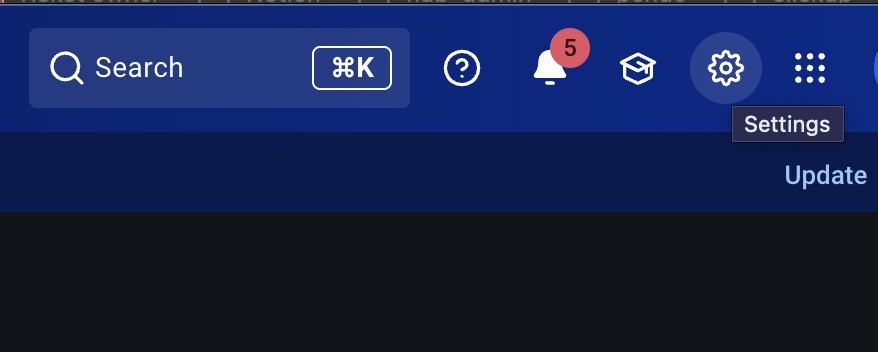
Open Docker Desktop and click the gear icon in the top bar to open Settings:
Go to Docker Engine. The daemon configuration is the JSON shown there — add a dns entry to it, keeping the rest of the JSON intact, then click Apply & restart:
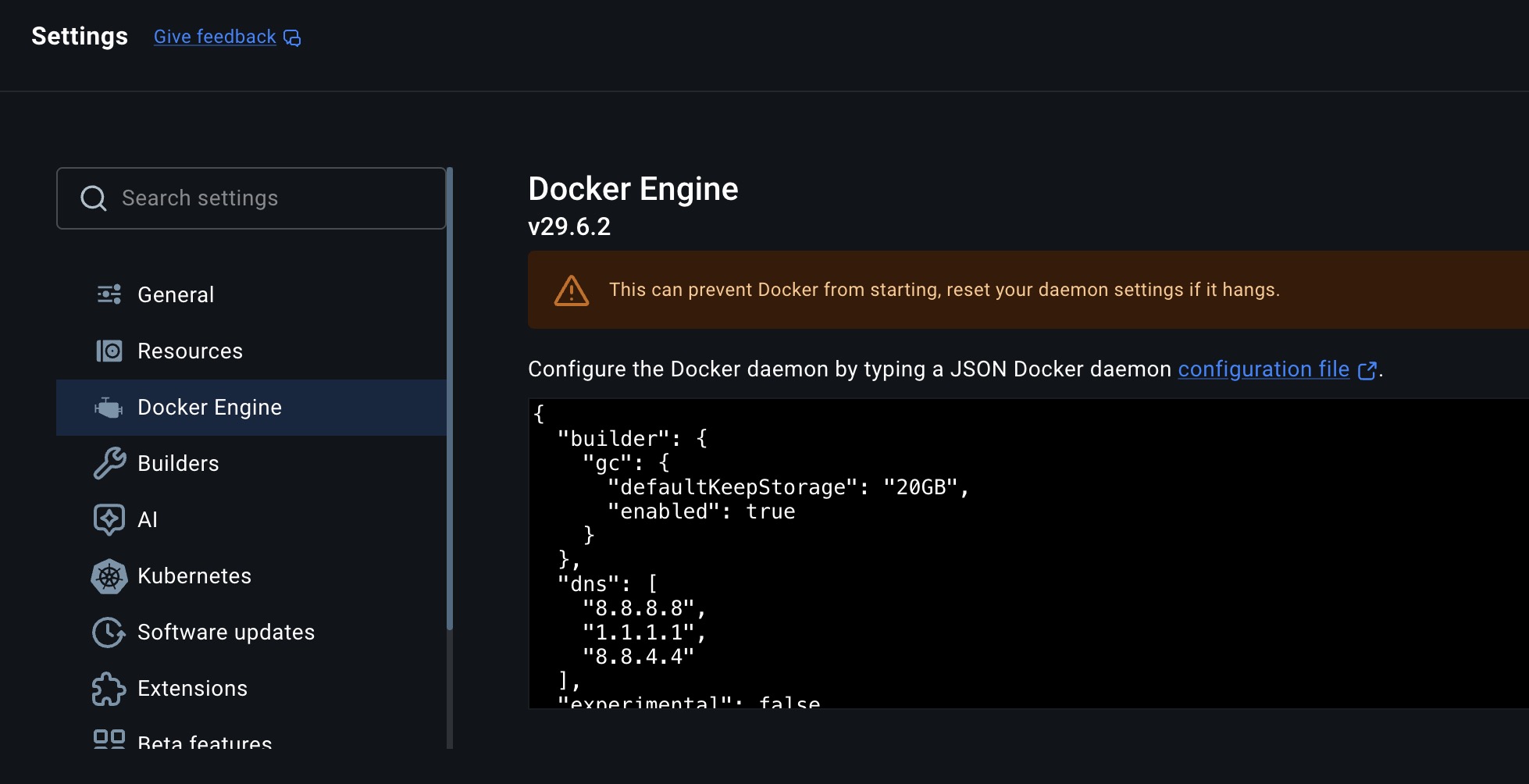
{
  "dns": ["10.0.0.10", "8.8.8.8"]
}
Keep any settings that are already in that JSON - add the dns key alongside them. Your own resolver goes first in the list; public ones can stay behind it as a fallback.
Edit /etc/docker/daemon.json (create it if it does not exist), then restart Docker:
{
  "dns": ["10.0.0.10", "8.8.8.8"]
}sudo systemctl restart docker3. Recreate the Edge container
A container reads its resolver list when it is created, so it has to be restarted to pick up the new setting:
docker restart xyte_edgeUse your own container name if it differs - docker ps lists it. If the container still cannot resolve, remove it and run the Edge install command again so it is created fresh.
4. Verify from inside the container
docker exec -it xyte_edge sh
nslookup eu1.edge.xyte.io
nc -zv -w 5 eu1.edge.xyte.io 443
The name should now resolve, and the port test should end with succeeded!. The Edge returns to Online in the portal within a few minutes.
dnsis a list — you do not have to remove what is already there.Adding your own resolver does not mean deleting the public ones.
"dns": ["10.0.0.10", "8.8.8.8"]is valid and common: the container works down the list and falls back to the next server when one does not answer. So if you are on8.8.8.8today and your internal DNS server arrives next week, you just add it — nothing has to come out.Put your own resolver first. Order is the part that matters. A resolver your network blocks does not fail fast: every lookup waits about 5 seconds for it to time out before the next server is tried, which shows up as a slow or flaky Edge rather than as a DNS error. A public resolver also cannot answer for internal-only names. Both reasons put yours at the front, public ones behind it.
Errors shown on the Edge in the portal, and what each one means.
| Scenario or error | Likely meaning | Recommended next steps |
|---|---|---|
| Edge agent is in error | Host offline, device offline, or required traffic is blocked. | Check: 1. Docker container status (running, restarting, exited) 2. Network connectivity from the host 3. Network connectivity from inside the container: nc -zv -w 5 eu1.edge.xyte.io 4434. Restart the Docker container If it still fails: 1. Remove Docker and reinstall it 2. Reinstall the Edge software again (fresh install) |
| Edge agent: Invalid params: invalid host name | The Edge ID format is wrong, or the value includes a hidden character or quote. | Try this: 1. Re-enter the Edge ID manually 2. Remove any extra quotes or hidden characters 3. Try the request again |
| Edge agent is offline | Start with offline troubleshooting, then verify outbound connectivity. | Start here: - Review the guide: Edge offline troubleshooting Then run these checks: 1. Run docker ps2. Enter the xyte_edge container: docker exec -it xyte_edge bash3. Run docker ps again from inside the container, if applicable4. Enter the second container: docker exec -it [container_id] bash5. Run nc -zv -w 5 eu1.edge.xyte.io 443 |
| Edge agent: Proxy ID already exists | The proxy ID is already attached to another Edge device. | Next steps: 1. Delete the Edge agent in the UI that is currently using this proxy ID 2. After the old ID is released, add the Edge again with the same proxy ID |
| Cannot read the response, check connection with the Zabbix server "zabbix-server" | The command could not be delivered to your Edge. zabbix-server is a host inside Xyte's cloud, not a port or a connection on your network. In practice it means the Edge is offline, so nothing answered. | Do not open port 10051 - it is internal to Xyte and is not reachable from outside. 1. Confirm the Edge shows Online in the portal 2. If it is not, follow Networking 3. On Docker Desktop, restart the app first - it stops when the user logs out 4. If the Edge is Online and this persists, contact [email protected] |
| Connection to Zabbix server "zabbix-server:10051" failed. Possible reasons: 1. Incorrect "NodeAddress" or "ListenPort" in the "zabbix_server.conf" or server IP/DNS override in the "zabbix.conf.php"; 2. Incorrect DNS server configuration. Operation timed out | An internal Xyte fault between our Zabbix frontend and our Zabbix server. zabbix-server:10051 sits inside Xyte's cloud and is not reachable from outside it - nothing on your network is involved. | No change is required on your side, and port 10051 should not be opened. Contact [email protected]. |
Port 443 tests open (nc, telnet, or Test-NetConnection succeeds) but the Edge has never connected | SSL/TLS inspection on the corporate or campus firewall. The TCP check passes, but the Edge's non-web traffic is re-signed or dropped. Xyte uses a custom certificate, which inspection breaks. | From the Edge's network, run:echo | openssl s_client -connect eu1.edge.xyte.io:443 2>/dev/null | grep "s:"Working: prints s:O=xyte, CN=server.zabbix-prodIntercepted: shows your firewall or proxy's certificate name instead, or no output at all. If intercepted, ask your network team to exempt eu1.edge.xyte.io:443 from SSL inspection. If the certificate check passes and the Edge still does not connect, send [email protected] the time of an attempt so we can trace it from our side. |
Testing connectivity with curl returns SSL: certificate subject name 'server.zabbix-prod' does not match target hostname 'eu1.edge.xyte.io' (curl error 60) | Expected and harmless. eu1.edge.xyte.io:443 is a mutual-TLS data channel that authenticates by certificate subject (server.zabbix-prod), not by DNS host name, so host-name verification in general-purpose tools such as curl or a browser fails even though the secure connection itself succeeds. It is not a misconfiguration of the Edge, the network, or Xyte. | No action needed if the Edge shows Active / Online — it is working. To test connectivity, check port reachability instead of the certificate: nc -zv -w 5 eu1.edge.xyte.io 443. A succeeded! result means outbound connectivity is fine. (telnet is not installed in the Edge container — use nc, which is.)You can also run curl with the -kv flags to skip certificate validation: curl -kv . If the output shows Connected to eu1.edge.xyte.io, the connection is established and the Edge is working as expected.Do not add certificate exceptions or change the Edge / proxy configuration based on this warning. |
From inside the Edge container, a connectivity test fails with nc: bad address 'eu1.edge.xyte.io' - while the same test from the host succeeds | A name-resolution failure, not a blocked port: the container never got an IP to connect to. The container does not inherit the host's DNS settings, and when Docker cannot reuse them it falls back to the public resolvers 8.8.8.8 / 8.8.4.4 - which a network that only permits its own DNS server will not answer. | Point Docker at your local DNS server: add "dns" to the Docker daemon configuration (Docker Desktop: Settings, then Docker Engine) and recreate the Edge container.Full walkthrough: Container cannot resolve DNS tab above. |
On a Xyte Secure Edge appliance, check the hardware before the software:
| Check | Healthy | If not |
|---|---|---|
| Power | The green PWR LED is lit and not blinking | Reseat the power supply; try another outlet |
| Network | The green LED next to the NIC is blinking | Reseat the cable; try another switch port |
If both LEDs are healthy and the Edge is still offline, run the trace in the first tab — the appliance is a normal Edge host from there on.
Last updated: 2026-09-14
Updated 25 days ago