
Cisco Control Hub
| Syncs | Webex / Cisco room & desk devices |
| Authentication | OAuth 2.0 (Webex Control Hub) |
| Direction | Inbound — imports devices into Connect+ |
Imports devices managed in Cisco Webex Control Hub — RoomOS endpoints, boards and desks — with live status and command support.
Prerequisites
To use the Cisco Control Hub cloud API with Xyte, make sure you have:
- Required account / tenant: Webex organization
- Required access: Control Hub admin access
- Required plan / license: Trial or paid subscription
- Where to verify: Webex Control Hub
Status and sync
- Xyte reads each device's connection status from Control Hub on every sync, every 15 minutes.
- A device shows as online when Control Hub reports it as Connected or Connected with issues. Any other status shows it as offline.
- Status changes appear in Xyte on the next sync.
- If a device is removed from Control Hub, Xyte doesn't mark it offline. It's removed from Xyte after a while.
How devices are organized
- When you add the connector, you pick a customer and the space to add it to. Xyte creates a connector space named
Cisco Control Hubinside that space, and everything from Control Hub is placed under it. - Each Control Hub location becomes a space under the connector space, with its floors and workspaces as nested spaces. Floors are named by their number and name.
- Each device is placed in the space of its workspace, or of its location if it has no workspace.
- Devices with no location or workspace are placed directly in the
Cisco Control Hubspace. - If a space with the same name already exists in the same place, Xyte uses it instead of creating a second one.
Devices also connected through an Edge
If a Cisco device is also monitored through a Xyte Edge, it appears twice in Xyte: once from the Edge and once from Control Hub. This is expected, as each source adds its own record.
Merge each pair into one device. Both records need to be under the same customer. The merged device keeps the data from both sources, and is counted once. See Merging and splitting devices.
Authorization with the Cisco Webex Control Hub.
Steps
-
Visit your tenant on Xyte
-
Go to "Cloud Connectors" and add a new "Cisco Control Hub" connector. Choose the customer and the space where the Cisco devices should appear. Xyte creates the
Cisco Control Hubconnector space there. -
Click "Authorize"
-
Copy and open the "Authentication Link" and enter the "Passcode" (copy from the same place as the link).
-
Click "Continue"
-
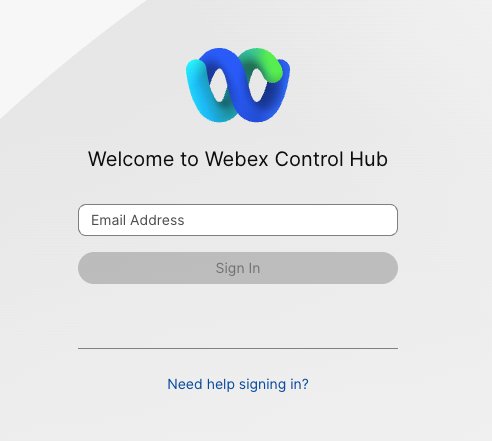
You will be redirected to Cisco Control Hub (also Webex)
-
Login if you are not signed in
-
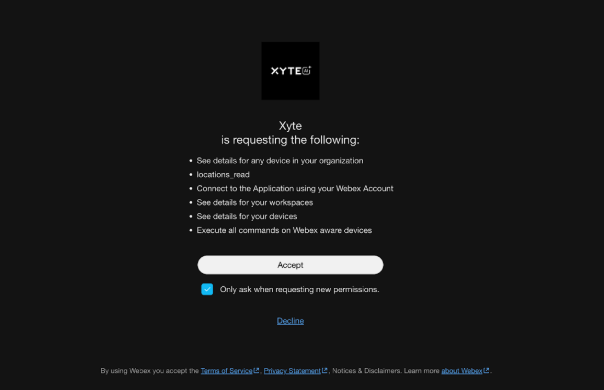
Click "Accept" to authorize the Xyte connection with the listed required Permissions
Collected information
Device Information
Not all device models provide all data points
- ID
- Status (online / offline)
- Display name and room / workspace location
- Product and device type
- Serial number
- MAC address and IP address
- Software version and upgrade channel
- SIP URLs
- Connected peripherals (cameras, touch controllers, room navigators) — also imported as child devices
Device telemetry
Collected for devices that support the Webex device API (xAPI):
Device telemetry uses thespark:xapi_statusespermission. Connectors authorized before this permission was introduced keep working normally but report only online/offline status — re-authorize the connector to enable the full telemetry below.
- System: uptime, volume, microphone mute
- Video inputs: connector type, signal state, and resolution per input
- Cameras: pan / tilt / zoom position, speaker-track and presenter-track status
- Room analytics: room occupancy (people count), people presence, room-in-use, ultrasound presence, ambient temperature, relative humidity, air quality index, ambient noise level, sound level, T3 emergency-alarm detection
- Peripherals: name, type, connection status, software version, and upgrade status per connected peripheral
- Network: IP address, gateway, subnet mask, MAC address, link speed, active interface, VLAN, Wi-Fi status (plus SSID and signal strength when on Wi-Fi), and the upstream switch name, port, and platform (learned via CDP/LLDP) — useful for physically locating a device
- Health / diagnostics: active alarm count, summary, and highest severity, taken from the device's own self-diagnostics
- Registration: Webex registration, SIP registration (with failure reason), provisioning status, and a derived registered indicator that flags devices that are online but unable to join calls
Room sensor readings (temperature, humidity, air quality) come from sensor-equipped models and peripherals (for example a Room Navigator); devices without sensors report them as "Not Available".
Network details refresh less frequently than the rest of the telemetry (approximately every fourth polling cycle).
Remote commands
- Reboot: Restart the device.
The above might change as the Webex device APIs are extended
Additional information
Connector root space name: Cisco Control Hub
If deleted and re-added:
Deleting this connector will remove all imported devices and their data. This action cannot be undone.
- A new connector will be created upon re-adding.
- If the name
Cisco Control Hubalready exists in that space, the new connector space will be namedCisco Control Hub 2. - The device tree will be re-imported under the new connector.
- The tree hierarchy will not be deleted.
After you submit, you'll see a confirmation that your credentials were submitted. Authorizing the integration and syncing devices can take up to 72 hours — you'll be notified when it's done.
For error messages and what to do about them, see the Cisco Control Hub troubleshooting guide.
Updated 3 days ago