
Sync Xyte Webhooks to Jira Incidents with Flow Automation (Create / Update / Close)
This uses Xyte webhooks with Jira flow automation to turn Xyte events into Jira incidents and keep them in sync. Xyte POSTs every event to one Jira incoming-webhook URL, and a change field in the payload tells the flow what to do: create opens an incident, update edits it, and close transitions it to Resolved.
Built in Space settings → Automation as one flow.
One recommended approach — not the only way. This design works, but you could also use separate flows per event, a custom field instead of the summary prefix, the REST API instead of the JQL branch, or a Xyte–Jira connector. Adapt to your setup.
Build steps
1. Open Automation and create the flow
Navigate to Spaces → CS → Space settings → Automation → Create flow (use the ••• menu next to the space to reach Space settings).
- Add the Incoming webhook trigger and set it to No issues from the webhook.
- Save the flow to generate the Webhook URL and Secret.
- Put both into Xyte's webhook configuration; send the secret as the HTTP header
X-Automation-Webhook-Token.
2. change = create → Create incident
Add an If block ({{webhookData.change}} equals create), then a Create incident action:
- Service project: CS
- Incident / request type: as appropriate
- Summary:
[{{webhookData.short_id}}] {{webhookData.title}} - Description: the field block (see Appendix)
The [{{webhookData.short_id}}] prefix is the match key that update and close rely on — it must always be present.
3. Capture the ID into a variable
Before the update block, add a Create variable action: name incidentId, smart value {{webhookData.short_id}}. (Smart values don't reliably resolve inside a search branch, so the variable is the workaround.)
4. change = update → find and edit
Add an If block ({{webhookData.change}} equals update), then a Branch flow / related work items (Type: JQL):
- JQL:
project = CS AND summary ~ "{{incidentId}}" - Uncheck "Only include work items that have changed since the last time this flow executed."
Inside the branch, add Edit work item actions:
- Summary:
[{{webhookData.short_id}}] {{webhookData.title}}(keep the prefix) - Description: the field block (see Appendix)
5. Capture the ID again
Variables are scoped per block, so add a second Create variable (incidentId = {{webhookData.short_id}}) before the close block.
6. change = close → find and transition
Add an If block ({{webhookData.change}} equals close), then a Branch flow / related work items (Type: JQL) with the same JQL and the same checkbox unchecked. Inside the branch, add Transition work item and set the destination status to a real status reachable from the incident's current status (e.g. Resolved) — not "copy from trigger."
What the finished flow looks like
With all branches in place, your flow should look like this — the trigger, the three change-routed If blocks, the two Create variable steps, and the JQL branches feeding the edit/transition actions:
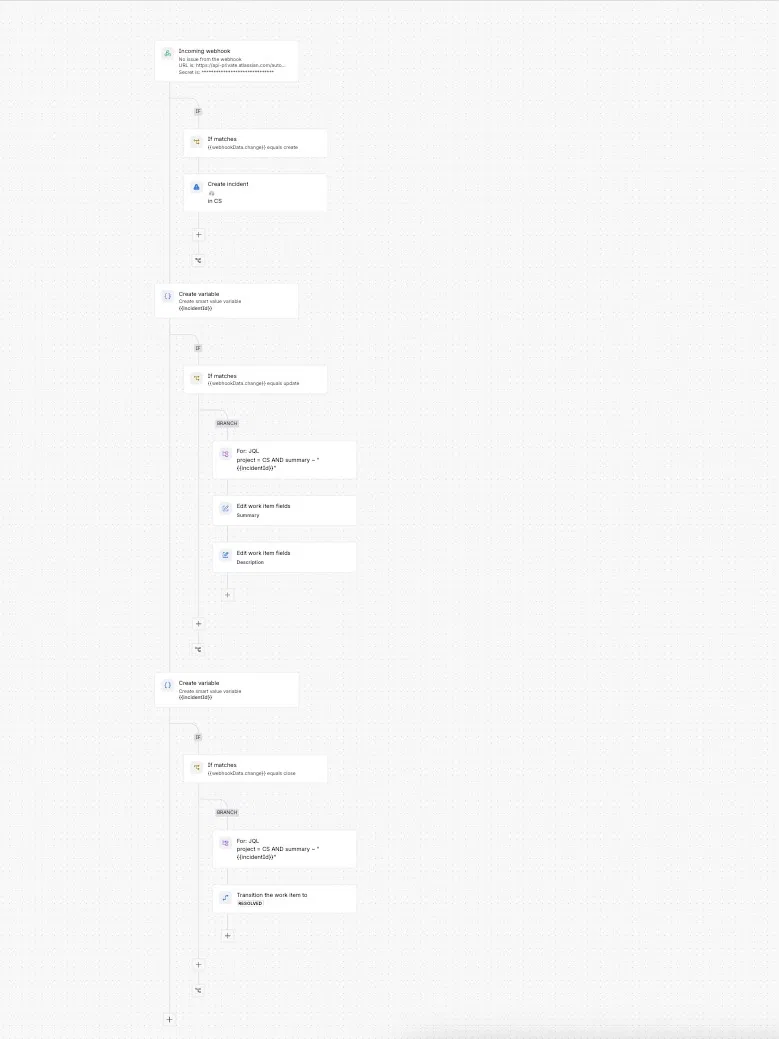
Top to bottom: Incoming webhook → create (Create incident) → variable → update (JQL branch → Edit summary + description) → variable → close (JQL branch → Transition to Resolved).
7. Enable and test
Save and enable, then test in order with the same short_id: send create (incident appears with [INC-ABC123] in the title) → send update (audit shows Success) → send close (transitions to Resolved).
Quick reference
| Event | Condition | Find step | Action |
|---|---|---|---|
| create | change = create | — | Create incident, summary [{{short_id}}] {{title}} |
| update | change = update | JQL branch summary ~ "{{incidentId}}" | Edit work item (keep prefix) |
| close | change = close | JQL branch summary ~ "{{incidentId}}" | Transition → Resolved |
How it works (the core idea)
1. One webhook, routed by change. Every event is POSTed to one URL; the flow branches on {{webhookData.change}} so each type runs its own logic.
2. The summary carries a stable ID. On create, the summary is prefixed with the unique short_id ([INC-ABC123] ...). This is the match key update and close search for. Remove it and they break.
3. Update and close find the incident first. The webhook carries no Jira issue key — only short_id. A JQL search branch locates the incident and puts it "in scope" so the edit/transition can act on it.
Prerequisites
- A Jira Service Management space for the incidents (this guide uses CS).
- Permission to create flows in that space's automation.
- The flow's scope must include the space being searched. If the JQL uses
project = CS, the flow must be scoped to CS, or the search returns nothing.
Troubleshooting
"No actions performed" on update/close. The flow ran but a condition stopped it — usually the JQL branch found zero incidents. Check: the summary contains the short_id; the "only changed since last run" checkbox is unchecked; the smart value is captured into a variable; the project/scope line up.
Smart value works at top level but not in the branch. {{webhookData.short_id}} can resolve to empty inside a branch. Capture it into a variable (incidentId) and search on {{incidentId}}.
Update succeeds, but close can't find the incident afterward. The update's Edit-summary stripped the [{{short_id}}] prefix. Always keep the prefix in every summary edit.
Branch finds nothing though manual search works. Scope mismatch: the flow is scoped to one space but incidents live in another. Make create project, JQL project, and flow scope all the same.
Close finds the incident but doesn't transition. No valid destination, or the target isn't reachable from the current status. Set an explicit status the workflow allows from where the incident sits.
"Acts on all matching work items" warning. The branch acts on every match; with a unique short_id that's one issue — safe to ignore. Keep ~ (contains); = would require an exact summary match and fail. For extra safety use summary ~ "[{{incidentId}}]".
Appendix: payload & description block
Example Xyte payload (reference any field with {{webhookData.<field>}}):
{
  "change": "create",
  "location": "Moon > Base #1 > Kitchen",
  "device": "Vacuum cooker",
  "id": "12345678-asdq-1234-5678-888f111e0d0r",
  "short_id": "INC-ABC123",
  "title": "Device issue: Moon > Base #1 > Vacuum cooker",
  "status": "active",
  "priority": 3,
  "description": "Pressure too low",
  "issue": "low_pressure",
  "created_at": "2026-06-28 13:03:06 +0000",
  "updated_at": "2026-06-28 13:03:08 +0000"
}
change is create / update / close. short_id is unique and constant across all three events for a given incident — that's why it works as the match key.
Description block used in Create incident and the update Edit action:
Device: {{webhookData.device}}
Location: {{webhookData.location}}
Issue type: {{webhookData.issue}}
Priority: {{webhookData.priority}}
Status: {{webhookData.status}}
Change: {{webhookData.change}}
Incident ID: {{webhookData.short_id}}
External ID: {{webhookData.id}}
Created: {{webhookData.created_at}}
Updated: {{webhookData.updated_at}}
This flow is stable — we haven't had issues that call for a dedicated troubleshooting guide. If you run into a problem, see the Jira integration guide or contact [email protected].
Updated about 1 month ago