
Keeping Xyte Edge Online on Docker Desktop
Main use case: an Edge host that has to keep running unattended, and doesn't.
The Edge shows offline in Xyte, and it only comes back when somebody connects to the machine and restarts Docker or the xyte_edge container. Typical signs:
- The Edge drops every few days with no pattern anyone can point to.
- Docker Desktop turns out not to be running, even though it is set to start automatically.
- Restarting the container brings it back, sometimes only after a second attempt.
- Nobody trusts the offline alerts any more, because so many of them clear on their own.
If that is your situation, the container is not the problem. Docker Desktop is a desktop application, and a desktop application only runs when a user is logged in, the machine is awake, and nothing has decided to save power. An Edge host has to keep running when nobody is at the keyboard, so the changes worth making are to what the host does while you are away — rather than getting faster at restarting the container.
This page is a set of recommendations for running the Edge on a host that stays up unattended.Xyte provides the Edge container. The operating system, Docker, virtualization and the local network sit with you or your IT team — so take the parts that fit your environment.
Each recommendation says what to change, and how to check whether it helped.
Work out which of the three causes you have
All three look identical in the Xyte portal — the Edge goes offline, then comes back when someone intervenes. They are told apart on the host.
Run the checks below after the next time it goes offline, before restarting anything. They point you at one of the three causes — you only need that cause's tab, not all of them.
| Run this on the Edge host | What you see | What it means |
|---|---|---|
docker ps | Error: cannot connect to the Docker daemon / pipe not found | Cause A — Docker Desktop was not running. The engine stopped with the user session, a reboot, or a crash. See the Cause A tab. |
docker ps -a | xyte_edge is listed as Exited or Created, not Up | Cause B — the engine came back but the container did not. See the Cause B tab. |
docker ps then docker logs --timestamps --since 24h xyte_edge | xyte_edge is Up, and the log shows repeated Unable to connect … connection timed out, Will try to reconnect, or getaddrinfo() … Unknown error | Cause C — the container ran the whole time but could not reach Xyte. See the Cause C tab. |
Timestamps are the proof.Compare the first failure line in
docker logs --timestampswith the time the Edge went offline in the Xyte portal (Edge → Incidents).If the log is silent across the outage, the container was not running — that is Cause A or B, not a network problem.
Cause A — make Docker start without a human
Docker Desktop's Start Docker Desktop when you log in only fires when someone logs in. After an unattended reboot — a Windows update at 03:00, a power cut — nobody logs in, so nothing starts, and the Edge stays offline until a person remotes in.
Recommended — run Docker Engine as a service instead of Docker Desktop
On a machine whose only job is to run the Edge, Docker Desktop is the wrong tool. A headless Docker installation starts with the operating system, needs no logged-in user, and removes Causes A and C in one move.
| Host | What to install instead |
|---|---|
| Windows Server / a dedicated Windows host | Docker Engine on WSL2, or a small Linux VM running Docker Engine |
| Linux | Docker Engine (systemctl enable --now docker) |
| macOS | A Linux VM or small always-on Linux host — macOS cannot run Docker Engine natively |
If you must stay on Docker Desktop
- Turn on Settings → General → Start Docker Desktop when you log in.
- Configure the host to log the user in automatically after a reboot, otherwise the setting above never fires. On Windows this is the auto-logon setting; check with your IT team, as it has security implications on a shared machine.
- Confirm the account stays logged in — a policy that logs idle users out will stop Docker with it.
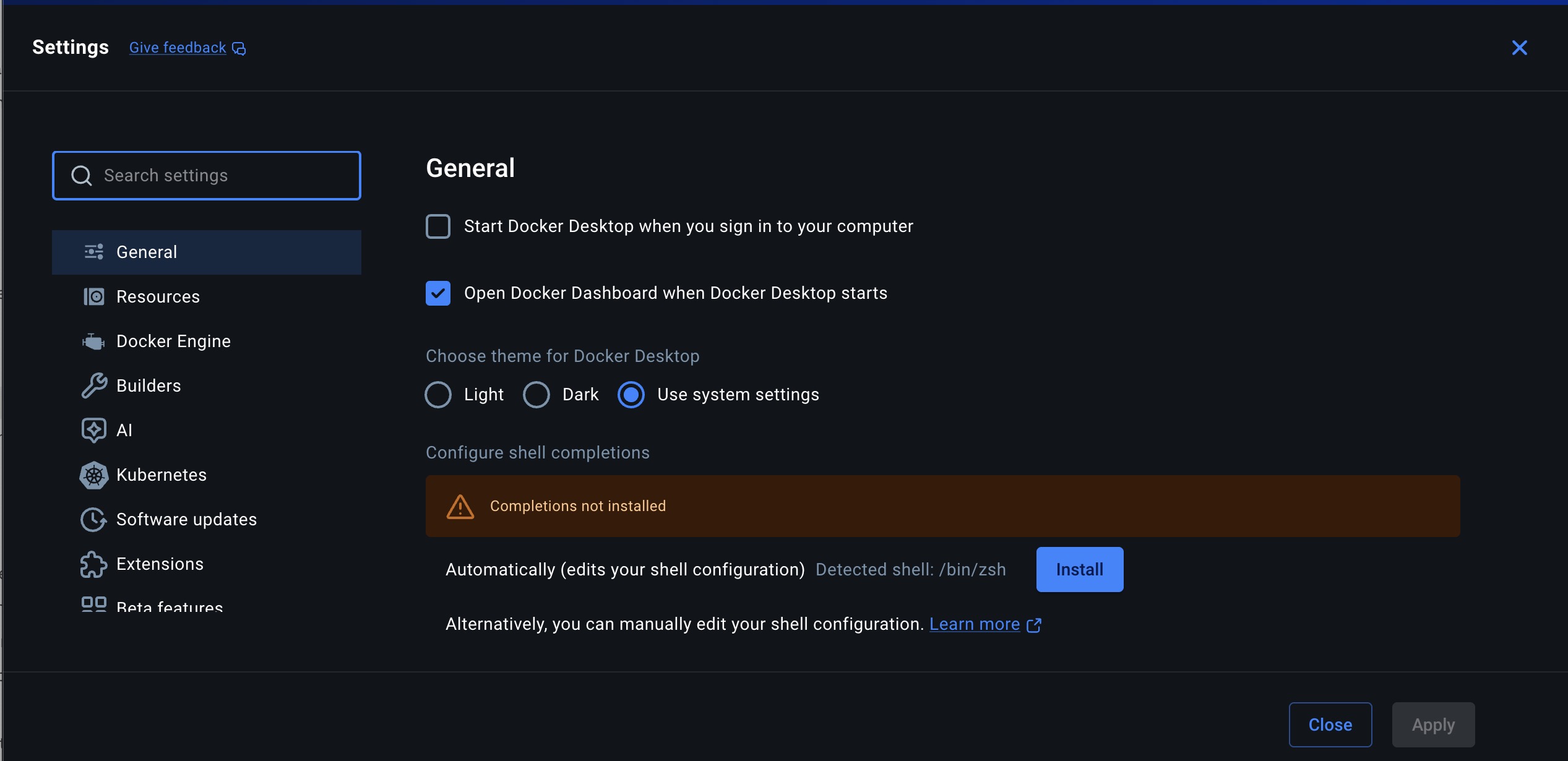
Settings → General on macOS. Start Docker Desktop when you sign in to your computer is unchecked here — tick it. Remember it still only fires when somebody signs in.
Verify: reboot the host, wait five minutes, and — without logging in yourself — check that the Edge comes back online in the Xyte portal. If it only returns when you log in, step 2 is not in place.
Windows: the Edge is online when you leave, and down the next morning
You start Docker Desktop, the container is up and the Edge is online. The next morning Docker Desktop is closed and the Edge is offline. Something Windows did overnight closed Docker Desktop — it only runs while the machine is awake and a user is signed in.
Find out what happened. The next morning, before restarting anything, run in PowerShell:
Get-WinEvent -FilterHashtable @{LogName='System'; Id=1074,6006,6008,42,7002; StartTime=(Get-Date).AddDays(-1)} -EA 0 | Format-Table TimeCreated, Id, Message -Wrap| Event | What happened overnight |
|---|---|
1074 | Something restarted the machine — the message names it, usually Windows Update |
6006 / 6008 | The machine shut down cleanly / lost power |
42 | The machine went to sleep |
7002 | The user was signed out |
| None of these | The machine stayed up and signed in — Docker Desktop closed on its own (an update or a crash) |
Then fix it for good. In PowerShell as an administrator:
| Problem | Tool | How |
|---|---|---|
| Machine sleeps | powercfg | powercfg /change standby-timeout-ac 0 and powercfg /hibernate off |
| Reboot leaves it at the login screen | Microsoft Autologon | Run it once for the Edge's user; it signs that user in after every reboot and stores the password encrypted. Check with your IT team first. |
| Someone signs out of Remote Desktop | Habit | Close the Remote Desktop window or lock the screen. Sign out stops Docker Desktop. |
| Policy signs idle sessions out | Group Policy | Remote Desktop Session Host → Session Time Limits: set the idle and disconnected-session limits to Never for this machine. |
| Docker Desktop closes on its own (update or crash) | Task Scheduler watchdog | Optional — see below |
| Windows Update restarts it | Windows Update settings | Agree a restart window with your IT team. |
| Power cut | BIOS/UEFI, or the hypervisor | Physical PC: power on when power returns. Hyper-V VM: Set-VM -Name "<vm>" -AutomaticStartAction Start |
Optional: Task Scheduler watchdog — if Docker Desktop closes on its own
Only needed when the event check above shows none of these events. Run this once, signed in as the Edge's user. It checks every five minutes and at every sign-in, and reopens Docker Desktop if it isn't running:
New-Item C:\xyte -ItemType Directory -Force | Out-Null
Set-Content C:\xyte\docker-watchdog.ps1 'if (-not (Get-Process "Docker Desktop" -EA 0)) { Start-Process "C:\Program Files\Docker\Docker\Docker Desktop.exe" }'
$action   = New-ScheduledTaskAction -Execute "powershell.exe" -Argument "-NoProfile -WindowStyle Hidden -File C:\xyte\docker-watchdog.ps1"
$triggers = @((New-ScheduledTaskTrigger -AtLogOn -User $env:USERNAME), (New-ScheduledTaskTrigger -Once -At (Get-Date) -RepetitionInterval (New-TimeSpan -Minutes 5)))
Register-ScheduledTask -TaskName "Xyte Docker watchdog" -Action $action -Trigger $triggers
The watchdog runs inside the signed-in session, so it can't help after a reboot, sleep or sign-out — those are fixed by the table above.
If the machine can't stay signed in, don't run Docker Desktop on it. A small Linux VM running Docker Engine starts at boot with nobody signed in — see the Ubuntu / Debian guide.
Cause B — make the container come back by itself
The Edge container must be started with a restart policy, so Docker brings it back after a crash or a host reboot.
Check the current policy:
docker inspect -f '{{.HostConfig.RestartPolicy.Name}}' xyte_edgealwaysorunless-stopped— correct, nothing to do.noor empty — the container will stay down after any stop. Re-run the Edge installation from the Xyte portal, which sets the policy for you, or recreate the container with--restart always.
unless-stoppeddoes not restart a container that was stopped by hand before the reboot.If you stop
xyte_edgemanually, remember to start it again.
Verify: docker restart the host's Docker service (or reboot), then run docker ps and confirm xyte_edge shows Up without you starting it.
Cause C — stop the host and its network from pausing the Edge
The container is up, but the connection to Xyte keeps breaking. On Docker Desktop this is usually one of four settings.
| Setting | What to do and why |
|---|---|
| Resource Saver (Settings → Resources → Advanced) | Turn it off. Resource Saver pauses the Docker VM when it looks idle. The Edge is mostly idle by design — it polls quietly — so the VM gets suspended and the Edge disappears from Xyte until something wakes the host. This produces exactly the "offline for an hour, then fine" pattern. |
| Host sleep / hibernation | Disable sleep and hibernation in the operating system's power settings, and set the screen to turn off instead. A sleeping host cannot monitor anything. On a laptop, also check the on-battery power profile. |
| Use kernel networking for UDP (Settings → Resources → Network, macOS) | Turn it on. Docker Desktop's default userspace network stack drops UDP packets under load, which breaks DNS inside the container — the getaddrinfo() … Unknown error lines in the log. Enabling kernel networking has been measured to take a host from a DNS failure every 15 seconds to none in 90 minutes. |
| Docker Engine DNS (Settings → Docker Engine) | On Windows/WSL2, adding "dns": ["8.8.8.8", "1.1.1.1"] is a valid fix when the container cannot resolve names but the host can.On macOS, do the opposite: leave the DNS setting empty and use the embedded resolver. Forcing external DNS servers pushes every lookup across the same faulty userspace network path and makes the failures dramatically worse. Fix macOS with kernel networking for UDP, above. |
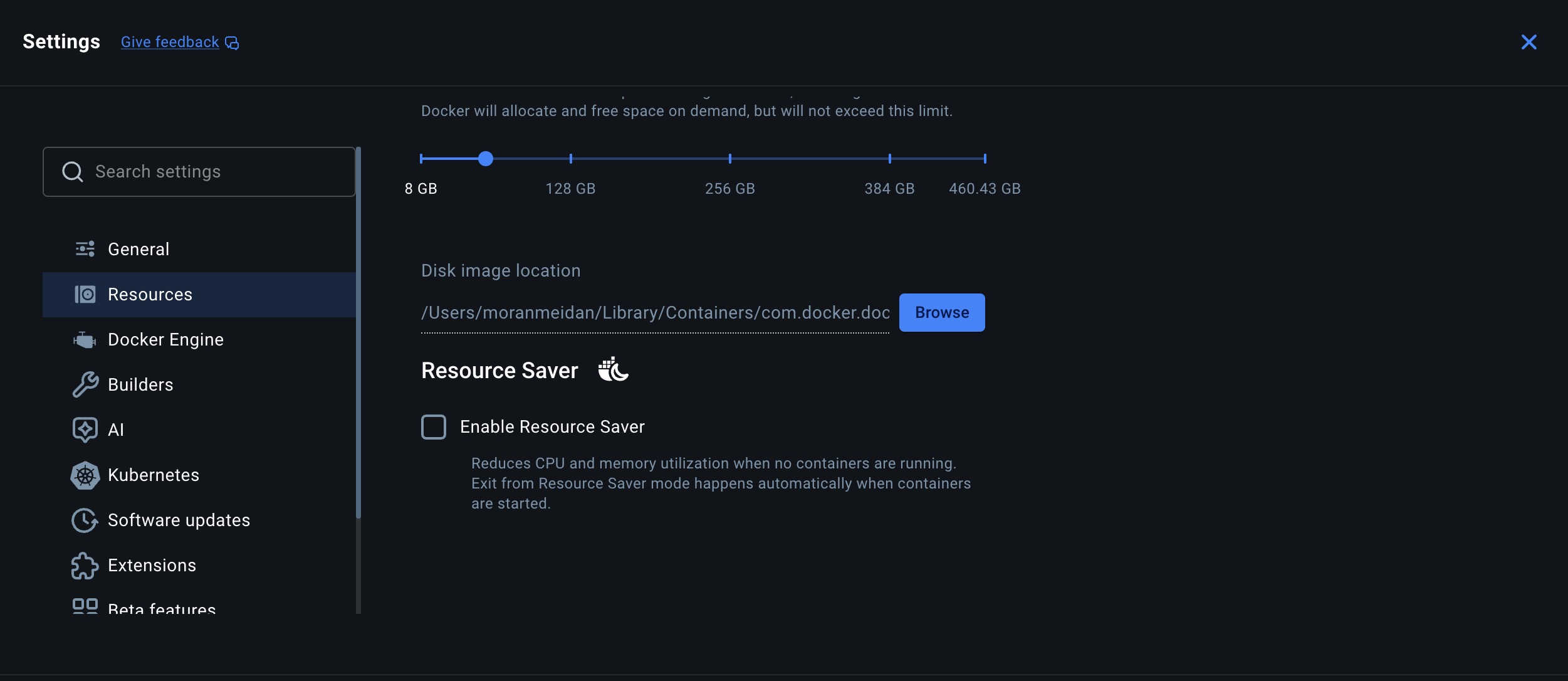
Settings → Resources → Advanced. Enable Resource Saver must be unchecked, as shown.
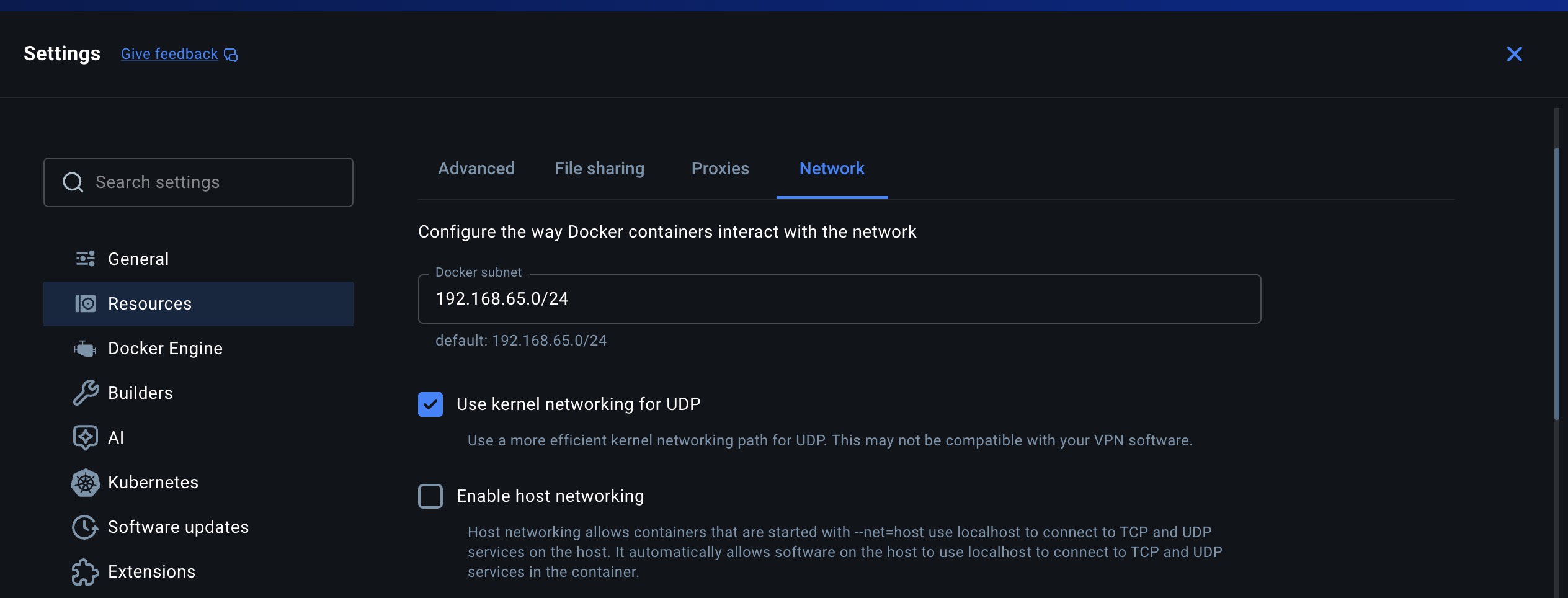
Settings → Resources → Network. Use kernel networking for UDP ticked, as shown. Docker notes this may conflict with some VPN clients — if the host runs a VPN and container networking breaks after enabling it, turn it back off and contact support.
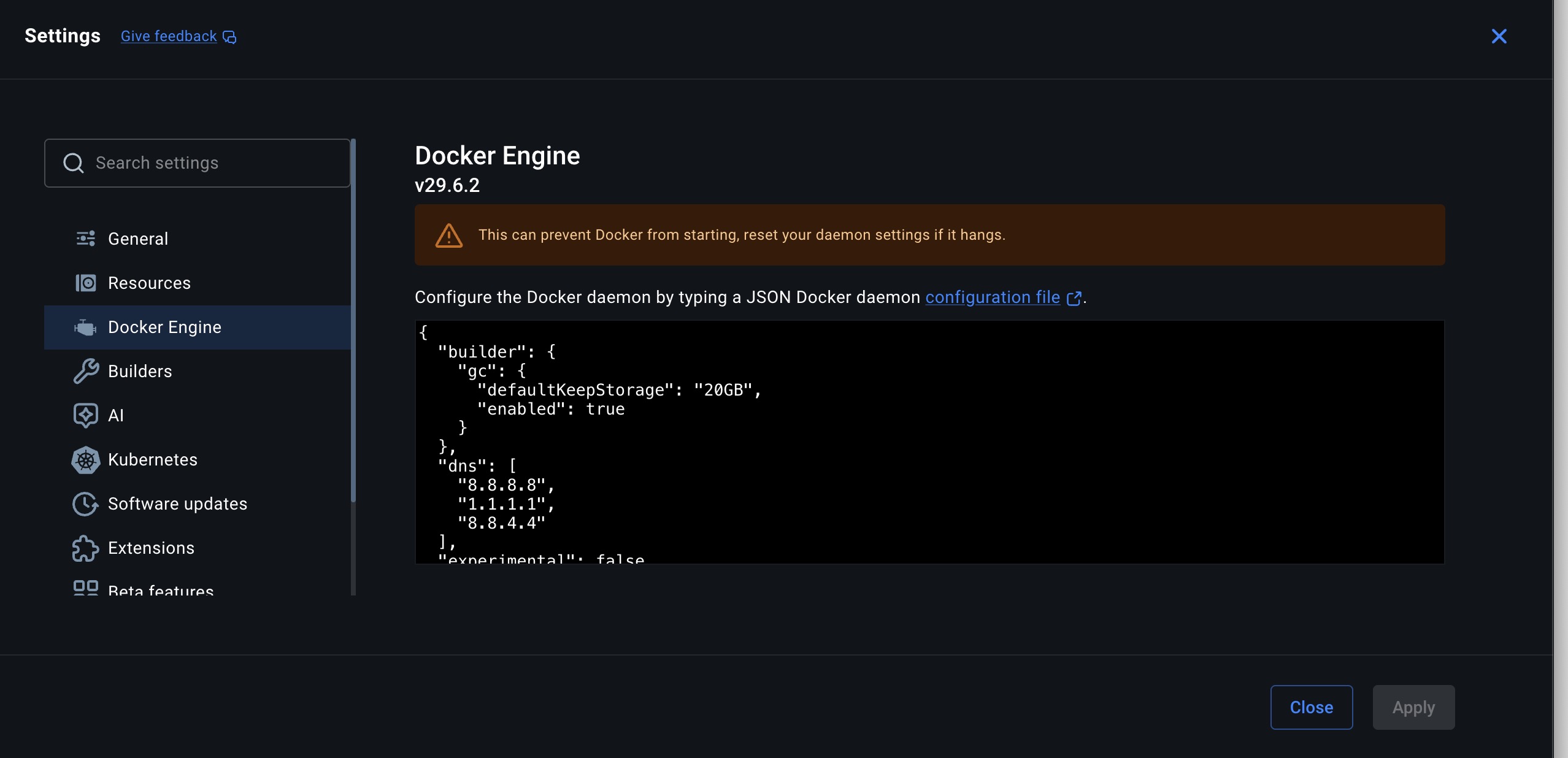
Settings → Docker Engine. On macOS this is what not to have: remove the "dns" block entirely and let the embedded resolver do the work. On Windows/WSL2 the same block is a legitimate fix.
Verify: leave the host untouched for 24 hours, then run docker logs --timestamps --since 24h xyte_edge and count the reconnect lines. They should be rare or absent.
Brief reconnects in the log are normal.Lines showing a connection dropping and being restored within a second or two never cross the offline threshold, and raise no incident in Xyte. Only outages lasting minutes affect monitoring.
Judge by the Edge's incidents in the portal, not by the log's noise level.
Reduce the alert noise while you fix the host
This one is not a cause — it applies whichever of A, B or C you have. Until the host is stable, two features stop short outages from filling your inbox with alerts that resolve themselves.
| Setting | Where | What it does |
|---|---|---|
| Incident notification delay | Space → Settings → Notifications | Waits the chosen time before sending an offline notification. If the device recovers first, nothing is sent. Sub-spaces inherit it. Most sites are far quieter at 15–30 minutes than at the default. |
| Flapping incidents consolidation | On by default, nothing to set up | Merges repeated offline/online cycles on the same device into a single incident instead of one per cycle. See Incident flapping consolidation. |
Set the delay from how long a real problem takes you to react to.A delay only postpones the notification — a device that is genuinely down still alerts once the delay passes.
Checklist
| # | Check | Done when |
|---|---|---|
| 1 | Docker starts without anybody logging in | The Edge returns after an unattended reboot |
| 2 | xyte_edge restart policy is always or unless-stopped | docker inspect shows it |
| 3 | Resource Saver off, host sleep and hibernation off | Settings and power profile confirmed |
| 4 | macOS: kernel networking for UDP on, Docker Engine DNS left empty | 24 hours of logs with no getaddrinfo errors |
| 5 | Notification delay set on the spaces that alert most | Fewer self-resolving alerts |
| 6 | Windows: no sleep, Autologon, no idle sign-out, watchdog scheduled | The Edge returns by itself after a reboot, and after Docker Desktop is closed |
Related guides
Still offline?
Collect the logs and send them to [email protected] with the times the Edge was offline:
docker logs --timestamps xyte_edge > xyte_edge_logs.txt 2>&1Updated 8 days ago