
Incident flapping consolidation
How Xyte turns a device that keeps dropping and recovering into one incident instead of many.
A device is flapping when the same issue keeps coming back shortly after it clears. A common example is a display that goes offline and comes back every few minutes because its network connection is unstable. Without consolidation, each drop would open a new incident and send its own notifications.
With flapping consolidation, Xyte keeps all those drops in one incident, so the Incidents screen (Operations → Incidents) and your notifications stay focused.
Flapping consolidation is on by default for every organization. There's nothing to set up.

How it works
- If an issue comes back within 1 hour of the device's previous incident for that issue closing, the new incident is marked as flapping.
- From then on, each time the issue comes back, Xyte reopens that same incident instead of creating another one.
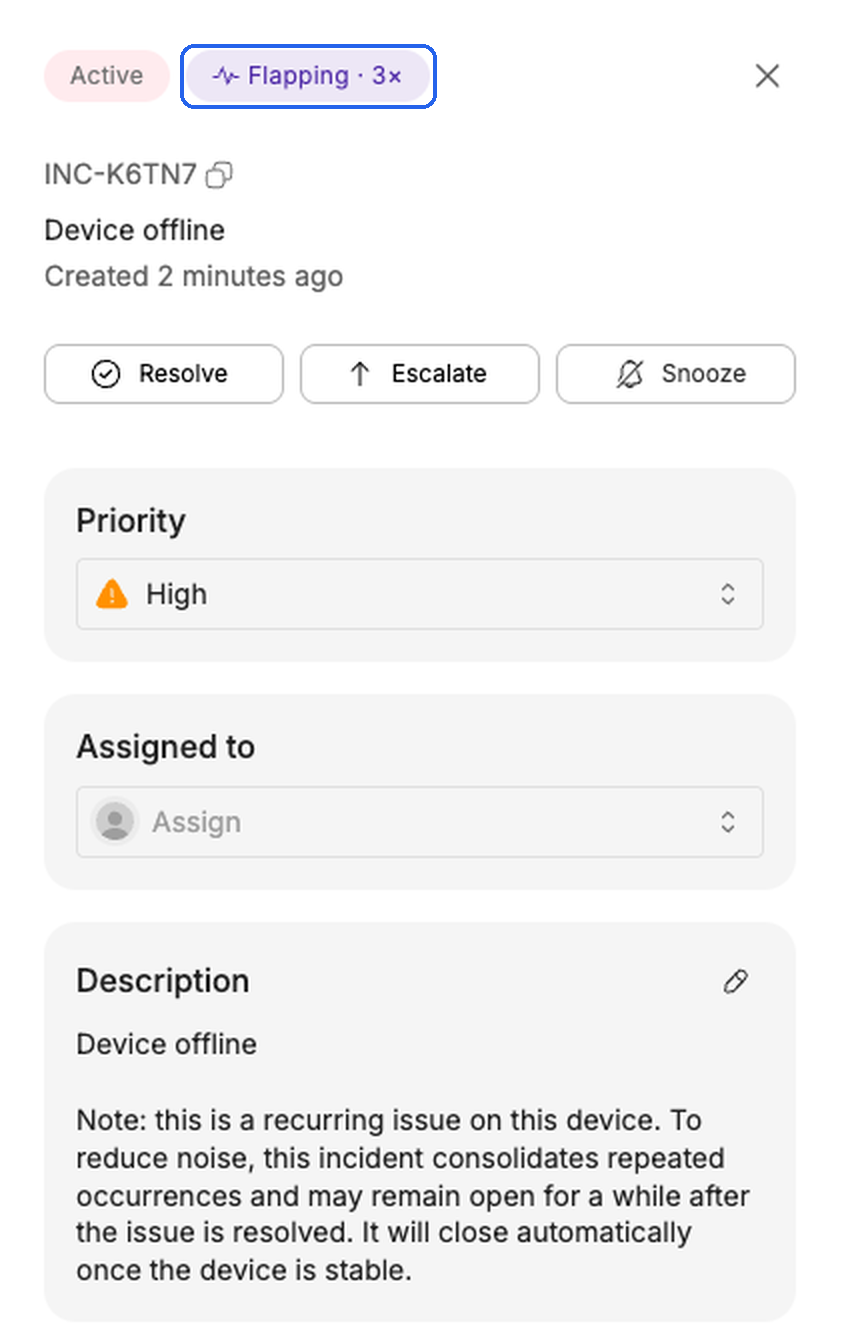
- The incident gets a Flapping badge in the incidents table and in the incident details. Once the issue has recurred, the badge shows how many times, e.g. Flapping · 3×. Hover over the badge to see the count and since when it has been flapping.
- The description includes this note: "this is a recurring issue on this device. To reduce noise, this incident consolidates repeated occurrences and may remain open for a while after the issue is resolved. It will close automatically once the device is stable."
- The incident details show an Occurrences section that lists each occurrence with its start, end and duration. An occurrence that is still happening shows as Ongoing.
Only incidents that close by themselves when the issue clears, such as Device offline, are consolidated. Incidents that someone has to close, such as a failed command, aren't. An incident you resolve yourself doesn't count toward flapping.
What happens when the device recovers
When a flapping device recovers, its incident isn't closed straight away. It's put on hold:
- The incident leaves the Active tab and appears under Snoozed. It no longer counts toward the device's or the room's status.
- If the issue comes back during the hold, the same incident becomes active again and its count goes up.
- If the device stays stable until the hold ends, the incident closes automatically.
The hold lasts at least 90 minutes from the moment the device recovers. When the issue comes back, the hold is extended to twice as long as the device had stayed stable, up to one week. A device that keeps flapping has to stay stable for longer before its incident closes.
Notifications
- You're notified when the flapping incident opens.
- When the issue comes back during the hold, no new "created" notification is sent.
- Recoveries during the hold don't send "resolved" notifications. The "resolved" notification is sent once, when the incident finally closes.
Connected ticketing and ITSM integrations work the same way: the ticket stays open while the device flaps and closes once the device is stable.
Find your flapping devices
Add the Top flapping devices widget to your Overview dashboard to see which devices flap the most. It ranks devices by how many times their incidents recurred over the last 24 hours, 7 days or 30 days, and shows the top 5 or top 10.
Turning it off
To turn flapping consolidation off for your organization, contact Xyte support.
Related
- Room incident consolidation: one incident when several devices in a room go offline together.
- Incidents
- Notifications
Updated about 2 hours ago