
Crestron XiO
| Syncs | Crestron devices managed in XiO Cloud |
| Authentication | API token (XiO Cloud) |
| Direction | Inbound — imports devices into Connect+ |
Syncs Crestron endpoints managed in XiO Cloud for unified monitoring.
Prerequisites
To use the Crestron XiO Cloud API with Xyte, make sure you have:
- Required account / tenant: XiO Cloud account
- Required access: Access to XiO Cloud API capabilities
- Required plan / license: Some API capabilities require XiO Cloud Premium
- Where to verify: XiO Cloud portal + Premium licensing page
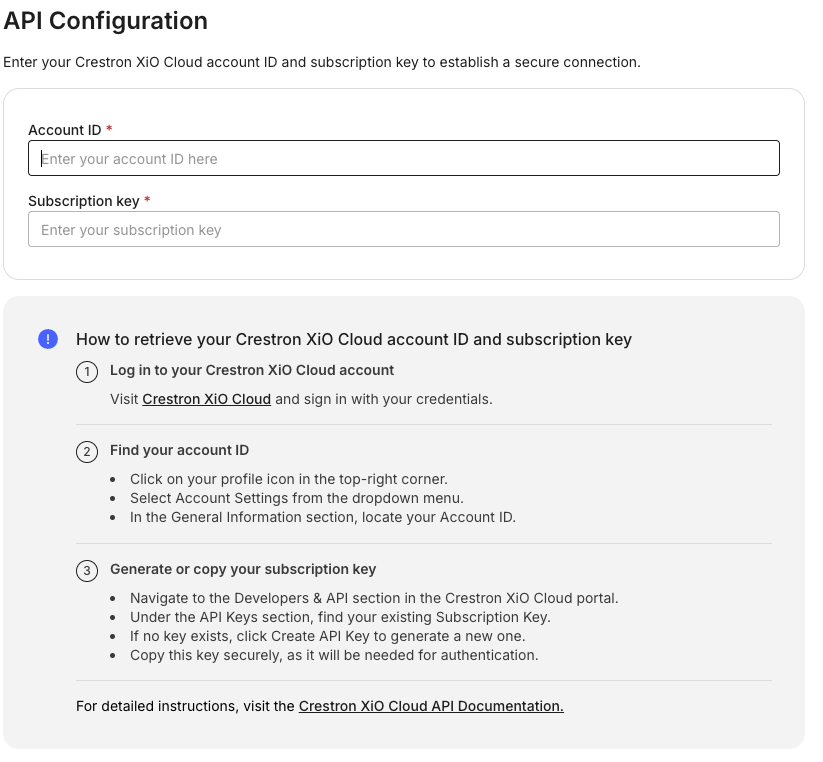
Authorization to the Crestron XiO cloud is done via an Account ID and Subscription Key. To obtain your Subscription Key, please contact your Crestron Technical Support or Account Representative.
Once obtained they can be entered in the authorization link:
More Info
Please speak with Xyte about any concerns:
- Crestron: Getting Started
Once enabled, please use the following Crestron guide which is summarized below:
- Crestron: Enable API Access
Collected Information
XiO integration provides extensive information that is model dependant, and each device will report data according to the underlying model.
Additional information
Connector root space name: Xio_v2
If deleted and re-added:
Deleting this connector will remove all imported devices and their data. This action cannot be undone.
- A new connector will be created upon re-adding.
- If the name
Xio_v2already exists, the new connector will be namedXio_v2 1. - The device tree will be re-imported under the new connector.
- The tree hierarchy will not be deleted.
After you submit, you'll see a confirmation that your credentials were submitted. Authorizing the integration and syncing devices can take up to 72 hours — you'll be notified when it's done.
Having trouble with the Crestron XiO Cloud connector? Open the Crestron XiO Cloud troubleshooting guide
Updated 28 days ago