
Room incident consolidation
How Xyte opens one incident when several devices in the same room go offline together.
When a whole room has a problem, like a power cut or a failed network switch, every device in it goes offline at about the same time. Without consolidation, each device would get its own Device offline incident and its own notifications.
With room incident consolidation, Xyte opens a single room incident for the outage, so the Incidents screen (Operations → Incidents) and your notifications show one problem instead of many.
Room incident consolidation is on by default for every organization. There's nothing to set up.
How it works
- When a second device in the same room goes offline within 15 minutes of the first, the first device's offline incident becomes a room incident. Devices that go offline after that are added to it.
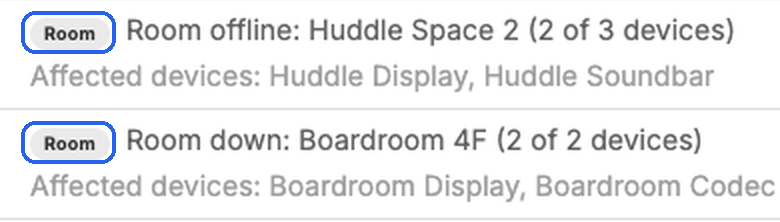
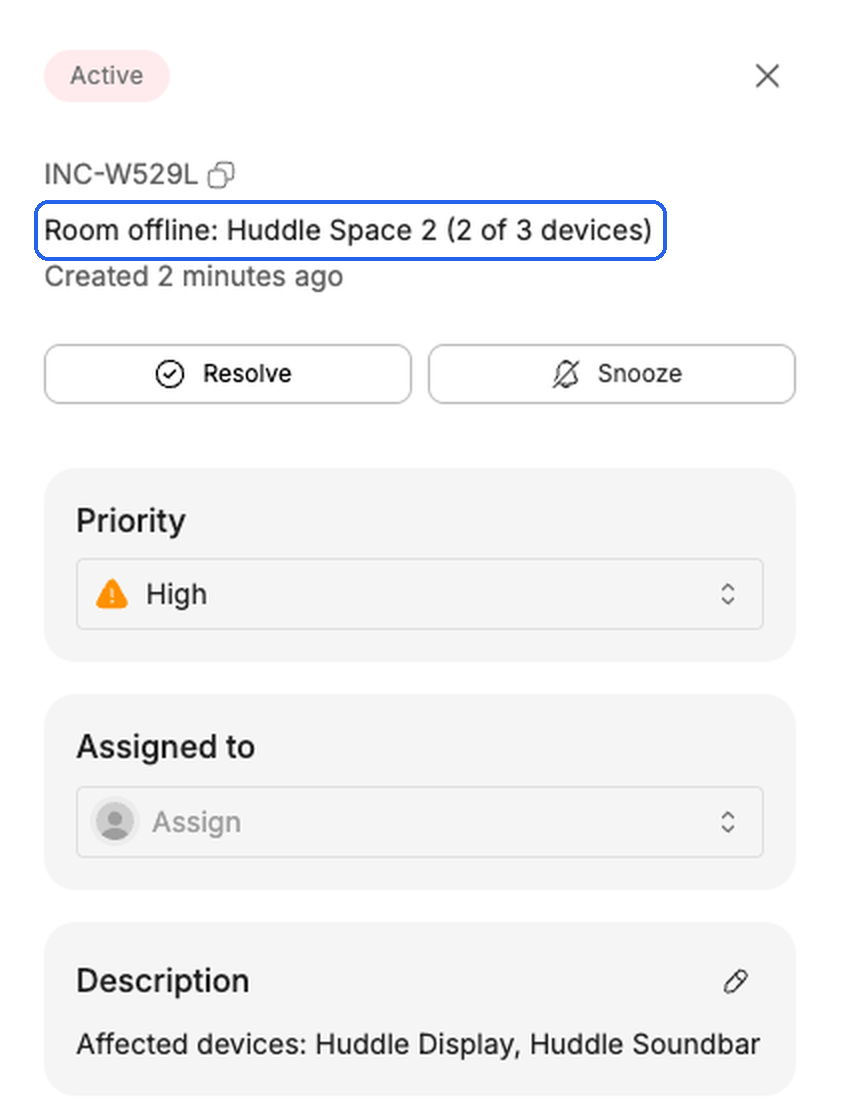
- The room incident has a Room badge, and its title shows how many of the room's devices are affected:
- Room offline: <room> (2 of 3 devices) when some devices in the room are still online.
- Room down: <room> (2 of 2 devices) when every device in the room is offline.
- The description lists the affected devices, e.g. "Affected devices: Huddle Display, Huddle Soundbar". The title, count and list update as devices go offline and come back.
- In the incident details, Space links to the room. Device and Model are empty, because the incident covers several devices.
- The room incident's priority matches the highest priority among the affected devices' incidents. If you change the priority yourself, your choice is kept.
- Each affected device's own incident list still shows the outage.
Only offline incidents are consolidated. Every other kind of incident is still reported per device.
Consolidation applies to rooms, meaning spaces with no spaces under them. It doesn't apply to the Unsorted or Unprovisioned spaces.
Resolving a room incident
- The room incident closes automatically when the last affected device comes back online.
- If you resolve it yourself, the affected devices' incidents close with it.
- If some of the devices are still offline, the Resolve dialog warns that devices of this room incident are still down and offers to snooze them instead. If you resolve anyway, devices that are still offline are reported again shortly after.
- If the room goes offline again within 1 hour of its room incident closing, flapping consolidation applies: the new room incident is marked as flapping, and later outages of the room reopen it instead of creating new ones.
Notifications
You're notified when the first device goes offline, as usual, and get one update when that incident becomes a room incident (when a second device goes offline). Devices that go offline after that don't send separate notifications. Connected ticketing and ITSM integrations get one ticket per room outage.
Hide offline incidents on the Incidents screen hides room incidents too, since they're offline incidents.
Turning it off
To turn room incident consolidation off for your organization, contact Xyte support.
Related
- Incident flapping consolidation: one incident for a device that keeps dropping and recovering.
- Incidents
- Notifications
Updated about 2 hours ago