
Yodeck
Yodeck is in Beta. If you don't see the Yodeck tile when you add a connector, contact Xyte support to have it enabled for your account.
Prerequisites
To connect Yodeck you need:
- A Yodeck account on a Premium or Enterprise plan — the Yodeck API is only available on those plans.
- A Yodeck API token with at least the Content & Device Manager role on the workspace(s) that hold your screens, and a token name without spaces. The Content Viewer role is not enough: it can't read your screens.
- The token's name and value — you enter both in Xyte (see Setup).
What Xyte collects
Each Yodeck screen is imported as a Xyte device, named after the screen in Yodeck.
Not every player type reports every data point. For example, web players don't report content information.
Device status
- Online / Offline — as reported by Yodeck for the screen.
- Unavailable — the screen exists in Yodeck but isn't registered to a player yet.
Device information
- Screen ID and UUID
- Player type and hardware version
- Player software version (shown as the device firmware)
- Workspace
- Last known IP address
- Created and last-modified dates
Telemetry
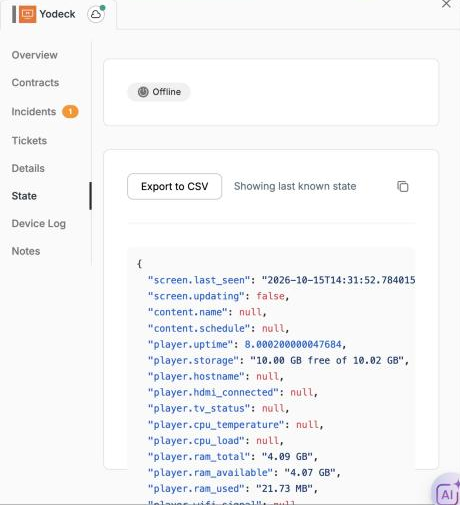
- Screen: last seen, update in progress
- Content: default content name, schedule name
- Player: uptime, storage, hostname, HDMI connected, TV status, CPU temperature, CPU load, RAM (total, available, used), Wi-Fi signal, lockdown, encryption, time of the last status update
Remote commands
No remote commands are available for Yodeck screens yet.
Status and sync
- Xyte reads each screen's state from Yodeck on every sync, every 5 minutes.
- A screen shows as online when Yodeck reports it online, and offline otherwise.
- Status changes appear in Xyte on the next sync.
- If a device is removed from Yodeck, Xyte doesn't mark it offline. It's removed from Xyte after a while.
Connect Yodeck to sync your Yodeck screens into your Xyte tenant and monitor them alongside every other device.
Get your API token
Step 1 — Open API Tokens in Yodeck
Sign in to Yodeck, open the user menu (top right) and choose Account Settings. Scroll down to Advanced Settings and click API Tokens.

API Tokens is a Premium feature: it's available on the Premium and Enterprise plans, and during the Yodeck free trial.
Step 2 — Generate a token with the right role
Click Generate Token.

On the Create an API Token page:
-
Enter a Token name with no spaces (for example,
xyte-connector). You'll enter the same name in Xyte, so note it down.The token name must not contain spaces. Yodeck sends the name inside the authorization header and rejects a name with a space, so Xyte shows Yodeck rejected the API token even when both values are correct. -
Give the token access to your screens. A token only sees the workspaces it has a role in, and a role on a parent workspace doesn't include the sub-workspaces under it. Choose one:
- Turn on Global Admin (recommended). The token then sees every workspace and sub-workspace, including ones you create later. Leave Billing Access off.
- Or add a role per workspace. Under Workspace Access, click Add New Role, pick the workspace, choose the Content & Device Manager role and click Ok. Repeat for every workspace and sub-workspace that has screens. Whenever you add a sub-workspace later, add it to the token too, or its screens won't appear in Xyte.

-
Check the form, then click Generate Token (top right).

Step 3 — Copy both values
Note the token name you entered and copy the token value Yodeck shows you.

Yodeck shows the token value only once. Copy it right away and store it somewhere safe.
For more detail, see Yodeck's guide: How to generate an API token.
Add the connector in Xyte
-
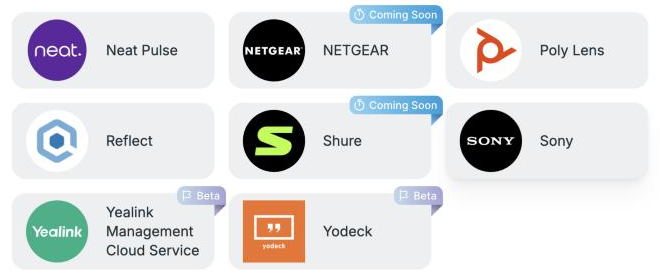
In Xyte, open Connections → Cloud Connectors, click Add connector, and pick Yodeck.
-
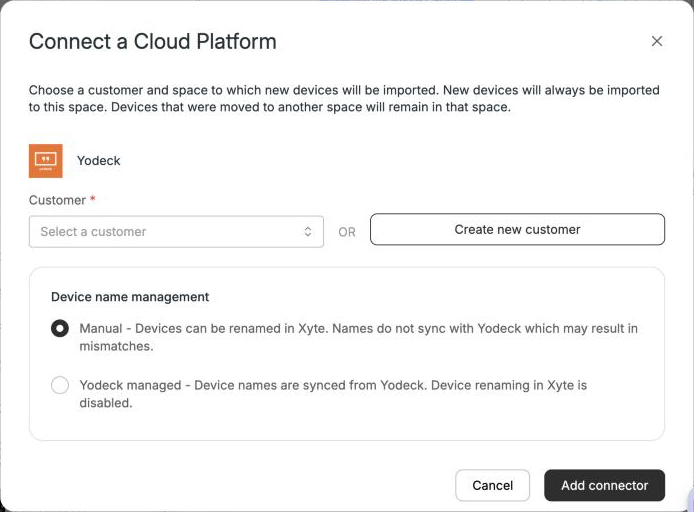
Choose the Customer the screens should be imported into, and pick how device names are managed:
- Manual — you can rename devices in Xyte. Names don't sync with Yodeck, so they may drift apart.
- Yodeck managed — device names are synced from Yodeck, and renaming in Xyte is disabled.
Then click Add connector.
-
On the API Configuration step, enter:
- Token Name — the name you gave the token in Yodeck.
- API Token — the token value you copied.
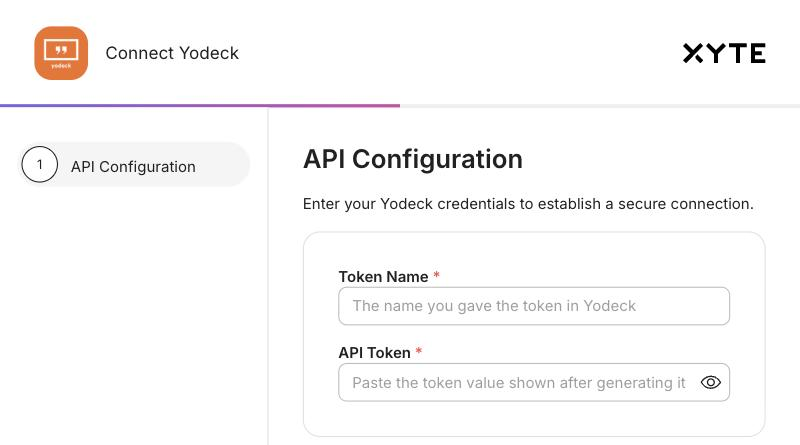
Click Continue. Xyte checks the token against your Yodeck account. On success the window shows Yodeck connection successfully authorized and you can close it; Xyte then imports your screens and keeps their status up to date.
Check the connection
Once the token is accepted, the connector shows as Active in Connections → Cloud Connectors. Open it to see when it last synced and how many screens it found. You can also switch the device-name setting here.
If Yodeck has no registered screens yet, Devices found stays at 0. It fills in on the next sync after you register a screen in Yodeck.
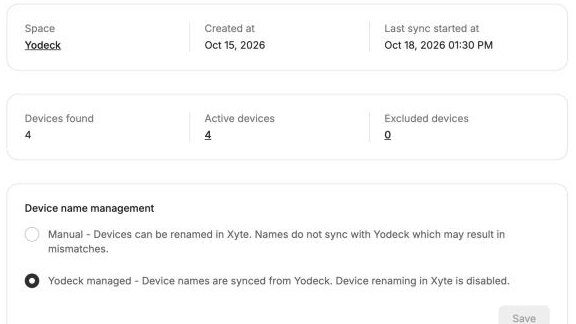
Click the Active devices count to list the imported screens. They're placed under the customer's Yodeck space, in Unsorted, until you move them.
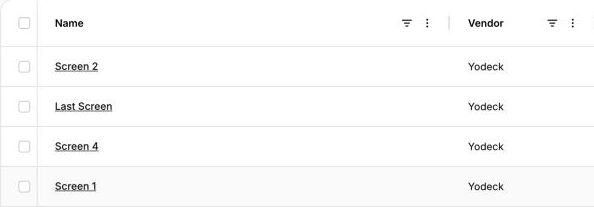
Each device shows the Yodeck player type as its Model (for example, Web Player) and the screen's UUID as its Serial number. The State tab shows the latest telemetry from the player.
Additional information
Connector root space name: Yodeck
Related troubleshooting articleFull list of Yodeck connector errors and next steps: Yodeck — Troubleshooting.
If the connector can't reach Yodeck, it goes into an error state and its devices are disabled. The error message is shown on the connector and sent to your organization's Admin contact by email.
| Error message | Likely meaning | Next steps |
|---|---|---|
| Yodeck rejected the API token (Invalid or empty authentication token) … Check that Token Name and API Token come from the same Yodeck token. | The token name contains a space, the name and value don't match, or the token was deleted in Yodeck. | Check both values in Yodeck → API Tokens. If the token name has a space, generate a new token with a name that has none (for example xyte-connector) and enter its name and value again. |
| Yodeck returned 403 — this API token's role cannot read screens … | The token's role is too low (for example, Content Viewer). | Generate a token with the Content & Device Manager role or higher, and update the connector. |
| Yodeck is currently rate-limiting requests. Please try again later. | Yodeck is temporarily throttling API calls. | Wait a few minutes and try again. During regular syncs, Xyte retries automatically. |
| Unable to authenticate against Yodeck. | Xyte couldn't validate the credentials against Yodeck. | Confirm your Yodeck plan includes API access (Premium or Enterprise), check both values, and try again. If it keeps failing, contact Xyte support. |
A screen shows as Unavailable — the screen exists in Yodeck but isn't registered to a player. Register (pair) the screen in Yodeck; it reports status on the next sync.
Updated 6 days ago