
Logitech Sync
| Syncs | Logitech room systems & peripherals, occupancy |
| Authentication | OAuth 2.0 (Logitech Sync) |
| Direction | Inbound — imports devices into Connect+ |
Connects Logitech Sync so Rally/Tap/Rally Bar rooms and their occupancy data flow into Connect+.
Prerequisites
After creating a new Connector on the Xyte portal, fill in the Logitech Sync API details
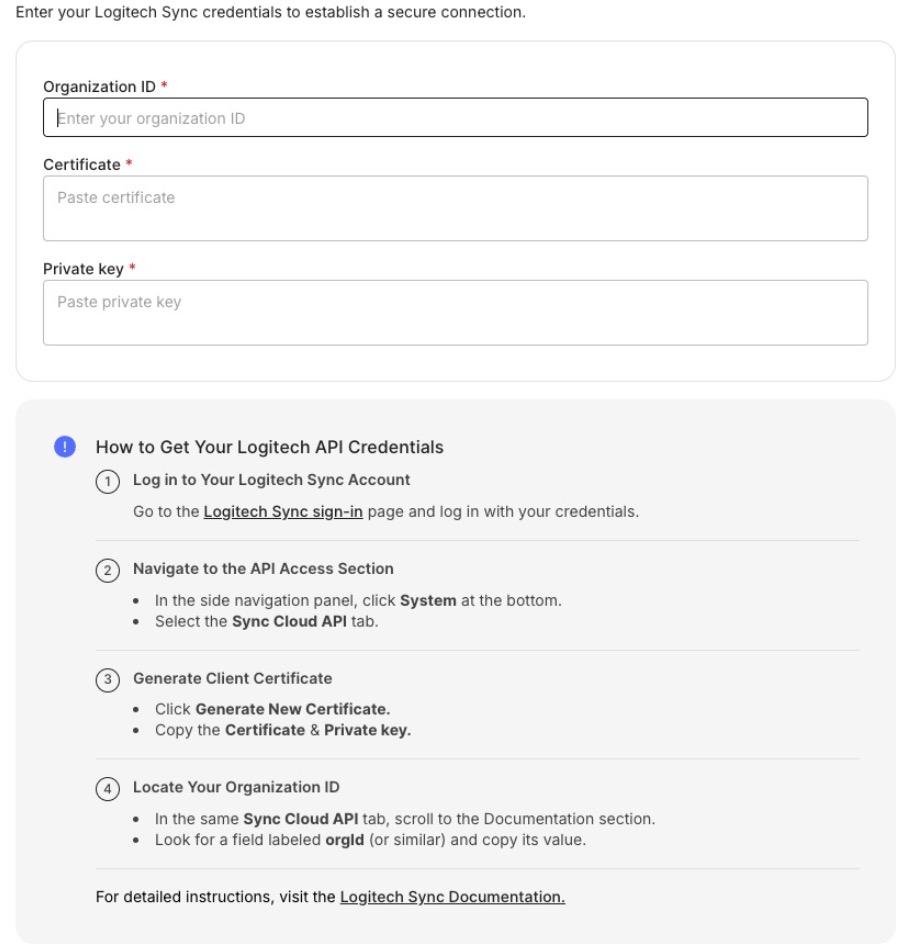
Connect to your Logitech Sync account to obtain the required API Credentials to allow Xyte to pull device related information.
Prerequisites
- Access to Sync: Make sure you can access the Sync Cloud API tab or CollabOS API tab in Settings within your Sync Portal to gather the required information.
- Licensed rooms: The Sync Cloud API only returns information about spaces with Plus, Essentials, or Select licensing, or an active Select trial.
If you don't have a paid account, please contact [email protected]. - Configure rooms in Logitech Sync: Xyte only pulls entries that Logitech classifies as type Room. Individual devices nested under a room are imported as children of that room. Before connecting Logitech Sync, re-check that the devices are enrolled in Logitech Sync and assigned under Rooms. If a device is not assigned to a room in Logitech Sync, or is not enrolled in Logitech Sync, Xyte cannot see it through the Logitech API.
Notes
Make sure to copy and paste the certificate and the private key with the headers and the footers
For example:
\-----BEGIN PRIVATE KEY-----
...
\-----END PRIVATE KEY-----
And:
\-----BEGIN CERTIFICATE-----
...
\-----END CERTIFICATE-----
Collected information
- Logitech Room
- Occupancy
- Status
- Logitech Device:
- Status
- Health / status
Additional information
Connector root space name: Logitech Sync
If deleted and re-added:
Deleting this connector will remove all imported devices and their data. This action cannot be undone.
- A new connector will be created upon re-adding.
- If the name
Logitech Syncalready exists, the new connector will be namedLogitech Sync 1. - The device tree will be re-imported under the new connector.
- The tree hierarchy will not be deleted.
After you submit, you'll see a confirmation that your credentials were submitted. Authorizing the integration and syncing devices can take up to 72 hours — you'll be notified when it's done.
Having trouble with the Logitech Sync connector? Open the Logitech Sync troubleshooting guide
Updated 24 days ago