
Rootly Webhook Configuration
Configure Rootly webhook authentication in Xyte using Rootly's supported query string secret format.
Overview
Configure Rootly webhook authentication in Xyte using Rootly's supported query string secret format.
If the secret is sent in an unsupported format, the webhook shows an Error status and delivery fails.
Correct configuration
| Field | Value |
|---|---|
| Create / Update / Close incident URL | https://webhooks.rootly.com/webhooks/incoming/generic_webhooks?secret=<your_secret> |
| Add custom header to requests | Checked |
| Custom Header — Field name | Content-Type |
| Custom Header — Field value | application/json |
Pass the secret as a query string parameter at the end of the URL, not as a header.
Supported endpoint formats
Rootly documents two valid endpoint patterns:
| Format | URL |
|---|---|
| Base endpoint | https://webhooks.rootly.com/webhooks/incoming/generic_webhooks |
| Fixed target endpoint | https://webhooks.rootly.com/webhooks/incoming/generic_webhooks/notify/<type>/<id> |
Both formats support the ?secret=<value> query parameter for authentication.
Common misconfiguration
Do not use the custom header to pass the secret. Use the custom header only for Content-Type: application/json.
| Field name | Field value | |
|---|---|---|
| Incorrect | Bearer | <secret> |
| Incorrect | Authorization | Bearer <secret> |
| Correct | Content-Type | application/json |
URL examples
Base endpoint:
https://webhooks.rootly.com/webhooks/incoming/generic_webhooks?secret=abcdNotify endpoint:
https://webhooks.rootly.com/webhooks/incoming/generic_webhooks/notify/Group/<group_id>?secret=abcd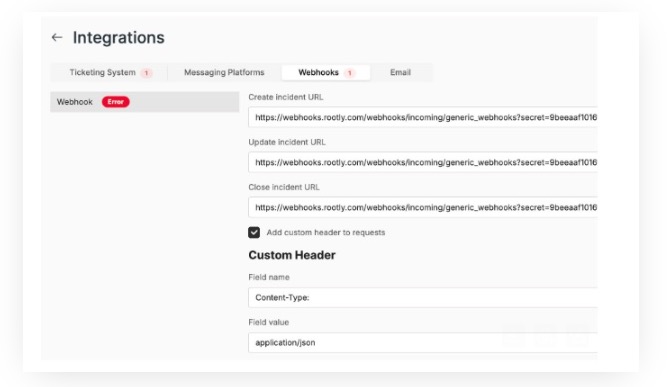
Additional resources
Updated 16 days ago
What’s Next
Did this page help you?