
Cisco Control Hub
Overview
Authorization with the Cisco Webex Control Hub.
API Access Requirements
To use the Cisco Control Hub cloud API with Xyte, make sure you have:
- Required account / tenant: Webex organization
- Required access: Control Hub admin access
- Required plan / license: Trial or paid subscription
- Where to verify: Webex Control Hub
Steps
-
Visit your tenant on Xyte
-
Go to "Cloud Connectors" and add a new "Cisco Control Hub" connector.
-
Click "Authorize"
-
Copy and open the "Authentication Link" and enter the "Passcode" (copy from the same place as the link).
-
Click "Continue"
-
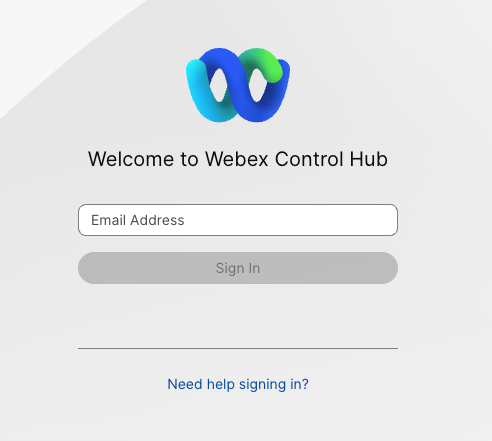
You will be redirected to Cisco Control Hub (also Webex)
-
Login if you are not signed in
-
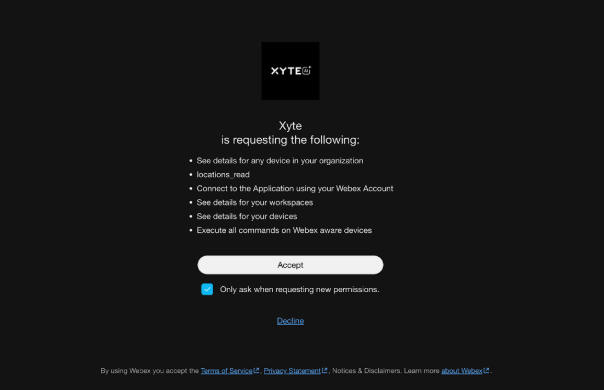
Click "Accept" to authorize the Xyte connection with the listed required Permissions
Collected information
Device Information
Not all device models provide all data points
- ID
- Status (online / offline)
- Display name and room / workspace location
- Product and device type
- Serial number
- MAC address and IP address
- Software version and upgrade channel
- SIP URLs
- Connected peripherals (cameras, touch controllers, room navigators) — also imported as child devices
Device telemetry
Collected for devices that support the Webex device API (xAPI):
Device telemetry uses thespark:xapi_statusespermission. Connectors authorized before this permission was introduced keep working normally but report only online/offline status — re-authorize the connector to enable the full telemetry below.
- System: uptime, volume, microphone mute
- Video inputs: connector type, signal state, and resolution per input
- Cameras: pan / tilt / zoom position, speaker-track and presenter-track status
- Room analytics: room occupancy (people count), people presence, room-in-use, ultrasound presence, ambient temperature, relative humidity, air quality index, ambient noise level, sound level, T3 emergency-alarm detection
- Peripherals: name, type, connection status, software version, and upgrade status per connected peripheral
- Network: IP address, gateway, subnet mask, MAC address, link speed, active interface, VLAN, Wi-Fi status (plus SSID and signal strength when on Wi-Fi), and the upstream switch name, port, and platform (learned via CDP/LLDP) — useful for physically locating a device
- Health / diagnostics: active alarm count, summary, and highest severity, taken from the device's own self-diagnostics
- Registration: Webex registration, SIP registration (with failure reason), provisioning status, and a derived registered indicator that flags devices that are online but unable to join calls
Room sensor readings (temperature, humidity, air quality) come from sensor-equipped models and peripherals (for example a Room Navigator); devices without sensors report them as "Not Available".
Network details refresh less frequently than the rest of the telemetry (approximately every fourth polling cycle).
Remote commands
- Reboot: Restart the device.
The above might change as the Webex device APIs are extended
Additional information
Connector root space name: Cisco Control Hub
If deleted and re-added:
Deleting this connector will remove all imported devices and their data. This action cannot be undone.
- A new connector will be created upon re-adding.
- If the name
Cisco Control Hubalready exists, the new connector will be namedCisco Control Hub 1. - The device tree will be re-imported under the new connector.
- The tree hierarchy will not be deleted.
Related troubleshooting
Having trouble with this connector?
Open the Cisco Control Hub troubleshooting guideUpdated 6 days ago